markv80348930
Participant
November 22, 2017
Answered

An evenly spaced board game path

  • November 22, 2017
  • 4 replies
  • 7653 views

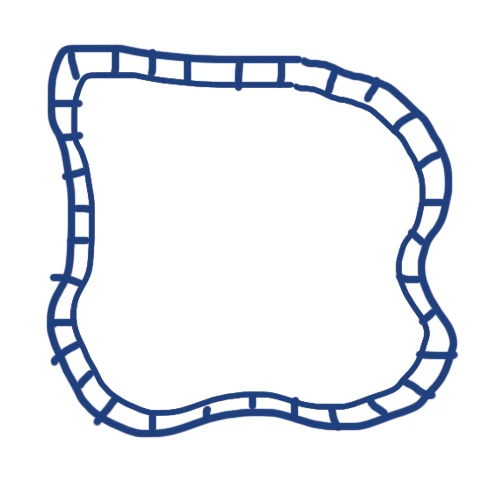
Hey there, I'm looking to create a simple board game path like a Ludo or Snakes and Ladders board but the board needs to be twisty like a race track and the squares need to be evenly spaced. My first thought was to create a brush and apply that to path, which worked pretty well, but now I've found out that there need to be a set amount of squares on the path.

Any ideas how to do this? It would like something like, but better than, this:

    This topic has been closed for replies.
    Correct answer Jacob Bugge

    Mark,

    As I (mis)understand it, you may:

    1) Create the race track as a stroke/nofill path with a Stroke Weight equalling the width of the outer bounds of the race track (40 or something) and the colour of the outer line set (black maybe);

    2) In the Appearance palette flyout click Add New Stroke with a Stroke Weight equalling the width of the inner part (the squares) of the race track (30 or something) and the colour of the outer line set (white maybe);

    3) In the Appearance palette flyout click Add New Stroke with the same Stroke Weight as in 2) (30 or something) and the colour of the dividing lines, same as the outer line set (black maybe), then tick Dashed LIne and set the Dash to the desired dividing line thickness (5 or something) and set the Gap to the Stroke Weight (30 or something).

    With the figures given (in some unit which could be mm), you will get a path with 30 x 30 (more or less depending on curvature) squares with bounding lines that are 5. You can try that to get a first impression, and choose the right proporties as desired.

    4 replies

    Participant
    September 25, 2018

    Thank you all for this post and your replies. I used this information to successfully put a timeline graphic together with some very specific client requests. This would have been impossible, or much more time consuming to create manually or with a different method.

    jane-e
    Community Expert
    Community Expert
    September 27, 2018

    bschuk​,

    It’s beautiful—thanks for sharing the finished product.

    markv80348930
    Participant
    November 23, 2017

    So what I did was, I made a brush using 40 squares then applied it to my path. This seemed to work ok but I think I prefer the stroke option. If the client comes back and wants the path adjusted I want the simplest quickest solution.

    Thanks, guys, you made my first post a real winner!

    jane-e
    Community Expert
    Community Expert
    November 23, 2017

    WOW—this brings back great memories of my childhood years when we would invent our own board games and play them for hours. I wish we had saved the boards and the rules.

    Monika Gause
    Community Expert
    Community Expert
    November 23, 2017

    Just out of curiosity: you can also get that without having to expand the stroke:

    Ton Frederiks
    Community Expert
    Community Expert
    November 22, 2017

    Or measure the length of the path, divide it by the number of rectangles needed, create a patten brush.

    Jacob Bugge
    Community Expert
    Community Expert
    November 22, 2017

    And another nice way, Ton.

    Jacob Bugge
    Community Expert
    Jacob BuggeCommunity ExpertCorrect answer
    Community Expert
    November 22, 2017

    Mark,

    As I (mis)understand it, you may:

    1) Create the race track as a stroke/nofill path with a Stroke Weight equalling the width of the outer bounds of the race track (40 or something) and the colour of the outer line set (black maybe);

    2) In the Appearance palette flyout click Add New Stroke with a Stroke Weight equalling the width of the inner part (the squares) of the race track (30 or something) and the colour of the outer line set (white maybe);

    3) In the Appearance palette flyout click Add New Stroke with the same Stroke Weight as in 2) (30 or something) and the colour of the dividing lines, same as the outer line set (black maybe), then tick Dashed LIne and set the Dash to the desired dividing line thickness (5 or something) and set the Gap to the Stroke Weight (30 or something).

    With the figures given (in some unit which could be mm), you will get a path with 30 x 30 (more or less depending on curvature) squares with bounding lines that are 5. You can try that to get a first impression, and choose the right proporties as desired.
    Kris Hunt
    Legend
    November 22, 2017

    That's a good solution!

    Jacob Bugge
    Community Expert
    Community Expert
    November 22, 2017

    And a nice colouring, Kris.

    And you leave it to Mark to work out how to do that.