
Participating Frequently
January 8, 2019
Answered

Anchor points are showing up spontaneously on my line like viruses (Illustrator)

  • January 8, 2019
  • 2 replies
  • 2174 views

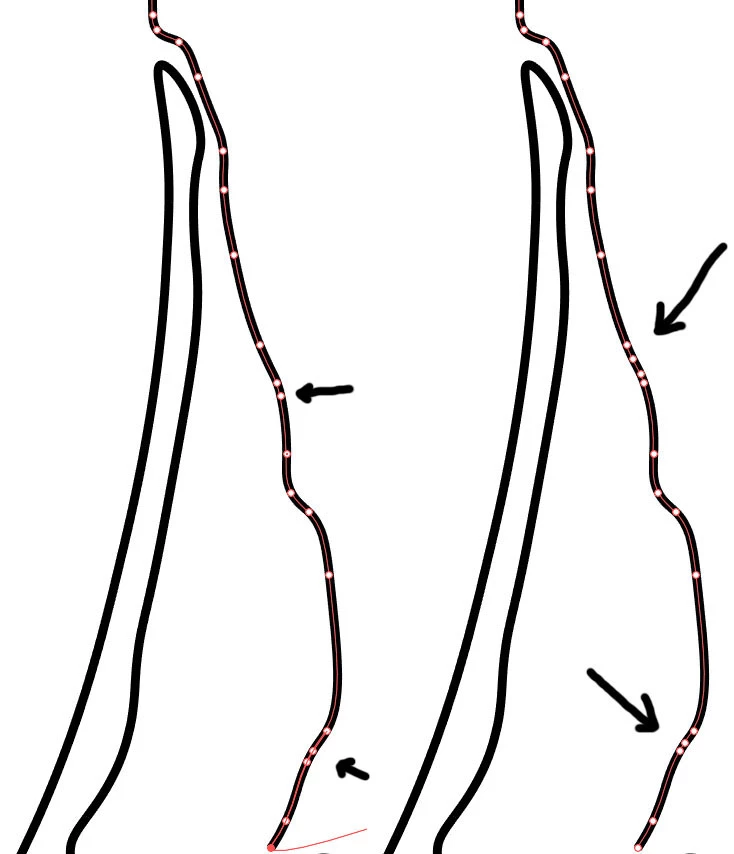
Hello, I'm sick and tired of this "thing". When I'm switching between lines, or just clicking ctrt+z, or just clicking Curvature Tool in order to edit line, additional anchor points are showing up. It's crazy. Line refreshes itself and I have additional anchors out of blue. It happens on long curved lines. Usually it's more crazy than on this screenshots. First line is also "infected", those double-anchors shouldn't be there. Originally there was only one point.

I can't basically re-edit line, because it's polluted with unwanted anchor points. Is there a way to fix that?
This topic has been closed for replies.
Correct answer Monika Gause

Here you have better link with my file: https://files.fm/u/pdtvnt2p

Couldn't edit previous post.


michals88983556  schrieb

Here you have better link with my file: https://files.fm/u/pdtvnt2p

Did you create the path with the Curvature tool? Or did you use a different tool?

The Curvature tool acts special with paths. If you don't want this to happen, then you can't use the Curvature tool. But need to use the pen tool.

2 replies

Monika Gause
Community Expert
Community Expert
January 8, 2019

Did you draw the line with the Curvature tool? Or did you draw it with a different tool?

Does this also happen when you use the pen tool for editing?

The Curcatire tool will always convert your path.

Shefali_L
Adobe Employee
Adobe Employee
January 8, 2019

Hi Michal,

Sorry to hear about this. As per your query, extra anchor points show up when you are trying to edit the line. I tried but I couldn't reproduce this issue at my end. I would request if you can share a few more details like:

  • Operating System(Version of Windows/MAC)
  • Version of Illustrator
  • Exact workflow or a small video of the issue.
  • A sample file

Thanks,

Shefali

Participating Frequently
January 8, 2019

I'm using Win 10 and Illustrator CC 2017, but when I had 2018 Trial it was the same way. I'm just messing around with lines, I'm making a map essentially. It happens when I'm switching between layers and just adding, or deleting points when using Curvature Tool, nothing special, I'm just editing it. As far as I'm aware it doesn't happen when using Pen. Usually "it" has patterns like that 4-anchor points on the screenshot. I've made two points only and additional two appeared. Unactive line looks normal, while active has those weird additional points.

You can download that file (part of it) from https://www.easypaste.org/file/NZnmvLUR/Map.ai?lang=pl

Basically, if you want to reproduce that effect, you have to edit line, delete unwanted points, move to another layer, play around a little bit and it should happen pretty fast.

Participating Frequently
January 8, 2019

Here you have better link with my file: https://files.fm/u/pdtvnt2p

Couldn't edit previous post.