Inspiring
June 23, 2018
Answered

anchor points missing on specific path

  • June 23, 2018
  • 3 replies
  • 2336 views

Hi,

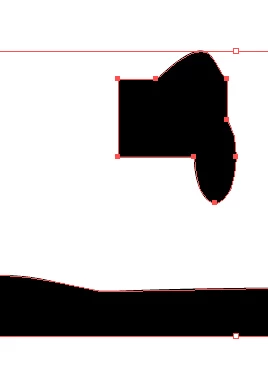
I have a drawing where anchor points do not show (but mouseover works).

I added another shape, and when I select that one, points show up as usual.

Next I reduced the problem artwork to just one closed path, but the problem persists
This topic has been closed for replies.
Correct answer Ton Frederiks

Here it is...

Dropbox - Bäume und Palmen- defekter Vektor3.ai

As tje drawing was quite complex originally, parts were grouped together and named.


I cannot explain it. There seems nothing special about the object, but if you select that object and choose Object > Flatten Transparency, the anchor points appear.

There is no difference between before and after flattening when you look at the Document info panel.

3 replies

ceyhun_akgun
Legend
June 23, 2018

Performance and graphics card problems can cause problems.

We recommend changing the Illustrator preformance settings.

Graphic Designer Educator / PrePress Consultant
Inspiring
June 24, 2018

Hi,

the problem art shows the problem on different computers (actually one mac and one pc).

It was originally around thousand paths - removing all but one had no impact.

Saving the file as an ancient format (AI3, the only one where there is no private part besides understandable path data) and reimporting does fix the problem.

I am more a programmer than an artist, so I would conclude that there is some hidden setting inside the private data the disables the points (or, maybe, shrinks them to invisible)

I would also assume that a script that recreates all the paths would produce a new copy without the problem - I have not yet tested that

Monika Gause
Community Expert
Community Expert
June 24, 2018

this is not the layers panel in your screenshot

manal shanableh
Legend
June 23, 2018

Hi

if you Show bounding box from view menu, the anchor points appear when you select the direct selection tool.

if you Hide bounding box from view menu, the anchor points will be appear when you select the selection tool.

Inspiring
June 23, 2018

https://forums.adobe.com/people/manal+shanableh  schrieb

Hi

if you Show bounding box from view menu, the anchor points appear when you select the direct selection tool.

if you Hide bounding box from view menu, the anchor points will be appear when you select the selection tool.

unfortunately this is not true: with either setting, and with the black and white arrows, I can get anchor points on one curve but not on the other one

Monika Gause
Community Expert
Community Expert
June 23, 2018

WHen you select that problem path, what does the layers panel say about it?

Inspiring
June 23, 2018

https://forums.adobe.com/people/Monika+Gause  schrieb

WHen you select that problem path, what does the layers panel say about it?

in fact, both paths report as 1 closed path; I cannot spot any kind of difference there

Monika Gause
Community Expert
Community Expert
June 23, 2018

birnerseff  schrieb

https://forums.adobe.com/people/Monika+Gause   schrieb

WHen you select that problem path, what does the layers panel say about it?

in fact, both paths report as 1 closed path; I cannot spot any kind of difference there

Can you please show a screenshot of that?

Also: your screenshot of the objects is cut off somehow.