0nimar
Inspiring
March 22, 2022
Answered

ANIMATED ZOOM NOT WORKING AFTER USING "CTRL+Y" OUTLINE VIEW

  • March 22, 2022
  • 4 replies
  • 2310 views

Why I have to restart 100 times a day my Illustrator 2022 if I want to activate back Animated Zoom after using Ctrl+Y Outline views ?


How to fix this problem?


Thank in advance!


I76700k

32gb ram

ssd

nvidia gtx950

This topic has been closed for replies.
Correct answer 0nimar


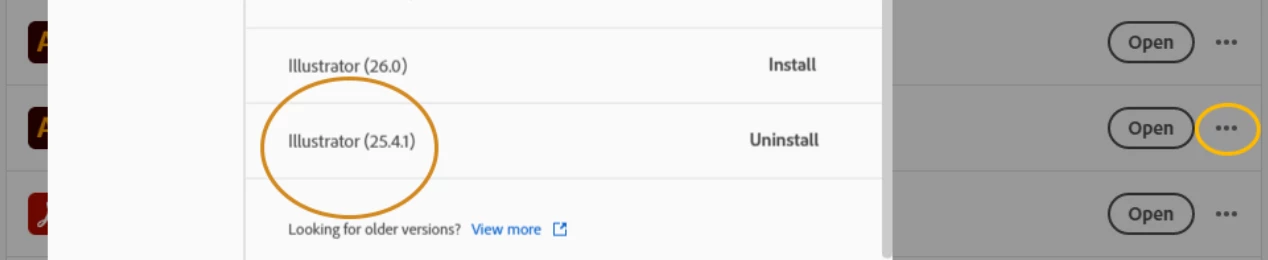
JUST DOWNGRADE - worked for me 

4 replies

0nimar
0nimarAuthorCorrect answer
Inspiring
March 23, 2022


JUST DOWNGRADE - worked for me 

Community Expert
March 22, 2022

I have the same issue on my Alienware X17 notebook. It's running Win 10 Pro; the hardware is an 11th gen Core i7 CPU, RTX-3070 GPU, 64GB of RAM and 4K 120Hz display.

I can open an Illustrator AI file and use GPU-accelerated animated zoom. But if I ever view the artwork in Outline view and then switch back to full color preview the animated zoom is disabled. In the menu "GPU Preview" is grayed-out. This issue started happening in one of the maintenance updates leading up to the 26.1 update. The problem has existed ever since.

When I first bought this notebook late last Summer I was able to use animated zoom in both outline and preview mode. It was really nice, especially when viewed on a high refresh rate, UHD resolution display. Not having animated zoom feels like going back in time several versions.

Community Expert
March 23, 2022

I just installed the lastest firmware update for the Alienware X17 R1 notebook as well as an NVidia's latest update for the GeForce Experience Game Ready Drvier for the RTX-3070. The updates have made no difference with the animated zoom bug I see in Adobe Illustrator. The animated zoom functions still get disabled after viewing a document in outline view. And there is no animated zoom in outline view either.

0nimar
0nimarAuthor
Inspiring
March 23, 2022

I also reinstalled all drivers and nothing changed. I can't use CTRL+Y - I don't have animted view! WTF Adobe? New updates again?

marliton
Community Expert
Community Expert
March 22, 2022

Hi. ¿Which Illustrator version do you have installed? Please check if there is some update available. I'm working with 26.1 and it works fine.


Marlon Ceballos
0nimar
0nimarAuthor
Inspiring
March 22, 2022

I even reinstaled CC and Illustrator the latest version.

Larry G. Schneider
Community Expert
Community Expert
March 22, 2022

If you go to Preferences can you not restart GPU without restarting?

John Mensinger
Community Expert
Community Expert
March 22, 2022

As far as I know, "Animated Zoom" has never worked in Outline View (running Windows). It is a function of GPU acceleration, which may not apply in Outline View. Is Animated Zoom still unavailable after you switch back to Preview mode?


0nimar
0nimarAuthor
Inspiring
March 22, 2022

After quiting the Outline View the illustrator not activating back the gpu view, thanks to the last update.