
andersl11404354
Participant
January 15, 2017
Answered

Annoying pop-up asking "Do you want to allow the following program to make changes to this computer?"

  • January 15, 2017
  • 6 replies
  • 10505 views

Annoying pop-up !!!

When I open Adobe Illustrator CS5.1, I get a pop-up window asking "Do you want to allow the following program to make changes to this computer?".

Why is it keep asking that? and how can I disable that?

The CS5.1 package runs on Windows 7 Ultimate

Dearest
Anders Lundgren

-----------------

In Danish:

Når jeg starter Adobe Illustrator CS5.1 kommer der nu hver gang en pop-up med følgende besked: "Do you want to allow the following program to make changes to this computer?"

Hvorfor kommer den frem? Det har den aldrig gjort før - og hvordan slipper jeg af med den besked?

Det er KUN Illustrator, ikke resten af CS-pakken !!

CS5.1 pakken kører på Windows 7 Ultimate

mvh

Anders Lundgren
This topic has been closed for replies.
Correct answer Mike_Gondek10189183

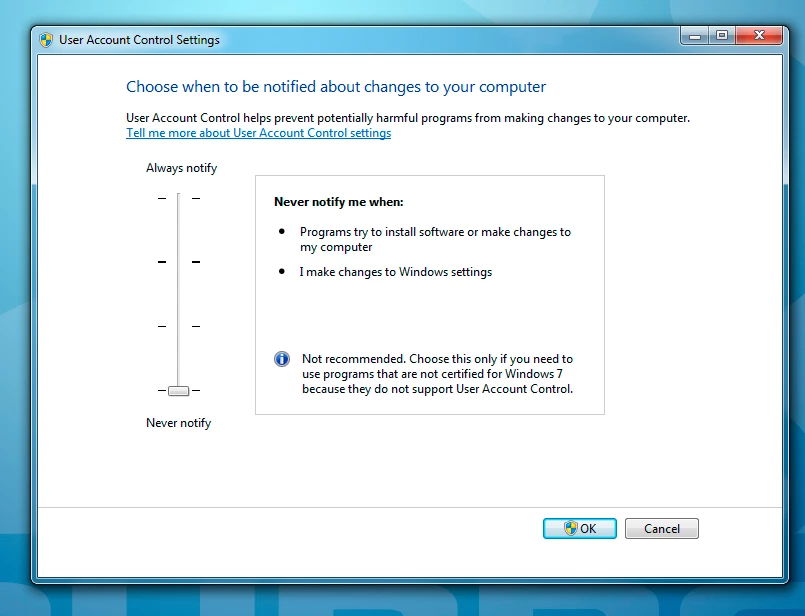
The dialogue is as follows. It says nothing about that you can set individually for each program!


Hi Anders,

Hope this helps

http://www.thewindowsclub.com/create-elevated-shortcut-run-programs-bypass-uac

6 replies

Participant
February 3, 2022

If anyone needs it, I've found the quick answer. You have to find the program's exe file. Right-click on it and go to Properties, and click on the 'Compatability' tab. Check to see if "Run this program as an administer" is checked. If it is, then uncheck it. (Something had probably happened to check that box, when it didn't used to be checked.)

Participant
September 22, 2021

Thank you so Much!!!!!!!

Participant
February 28, 2020

I have the same f situation on my window 8-10 when I want to open photoshop cs6 portable..🙎

Monika Gause
Community Expert
Community Expert
February 28, 2020

There is no "portable" version of Photoshop. So what you're seeing is probably Windows telling you that there is malware inside.

Participant
February 28, 2020

HEY! How it worked? Did photoshop opened?

Mike_Gondek10189183
Community Expert
Community Expert
January 16, 2017

This message appears in WIN 7 when the application does not have a valid certificate root authority. These types of notifications may be disabled from the User Account Control Settings.

  • From the Start menu, Select Control Panel
  • Navigate to System and Security > Action Center
  • From the left pane, Select Change User Account Control settings
  • Drag the scroll button to Never notify
  • Click on OK to save your settings
andersl11404354
Participant
January 16, 2017

Hi Mike,

It would be too risky, since it applies to all applications and not only for Illustrator.

I have used the program now for 4 years with no problems, but then after 13th January there have been problems with this pop-up !!?

Mike_Gondek10189183
Community Expert
Community Expert
January 16, 2017

I do not work on windows anymore, because the OS is easily corrupted so understand. But if my memory serves me correct, you could do this for only the one application.

Monika Gause
Community Expert
Community Expert
January 16, 2017

Mac OS is asking you this question.