Exit
  • Global community
    • Language:
      • Deutsch
      • English
      • Español
      • Français
      • Português
  • 日本語コミュニティ
  • 한국 커뮤니티
0

Another Parametric Question

New Here ,
Jan 04, 2018 Jan 04, 2018

Hi Adobies.

I have a client wanting to work some parametric designs into some work. I would have thought I can generate in Illustrator or photoshop. I have a sample attached. Could anyone recommend a way of achieving this sort of thing

Kindest Paul
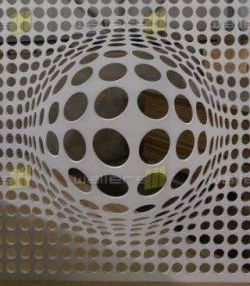
parametric.jpg

995
Translate
Report
Community guidelines
Be kind and respectful, give credit to the original source of content, and search for duplicates before posting. Learn more
community guidelines

correct answers 1 Correct answer

Community Expert , Jan 05, 2018 Jan 05, 2018

It is all in Illustrator.

Translate
Adobe
Community Expert ,
Jan 04, 2018 Jan 04, 2018

Your example looks like it may have been done with somewhat more sophisticated methods, but Photoshop's Distort > Spherize filter does something like that.

Translate
Report
Community guidelines
Be kind and respectful, give credit to the original source of content, and search for duplicates before posting. Learn more
community guidelines
New Here ,
Jan 04, 2018 Jan 04, 2018

Thankyou John. Ill have a look at that. I was hoping I could use illustator somehow to retain a vector file. Cheers

Translate
Report
Community guidelines
Be kind and respectful, give credit to the original source of content, and search for duplicates before posting. Learn more
community guidelines
Community Expert ,
Jan 04, 2018 Jan 04, 2018

Try and create a grid

Bildschirmfoto 2018-01-04 um 19.20.52.png

Make a rectangle and create a gradient mesh out of it

Bildschirmfoto 2018-01-04 um 19.20.16.png

Use the Liquify tool (what's the English name again?)

Bildschirmfoto 2018-01-04 um 19.20.44.png

Then apply the mesh as an envelope to the grid

Bildschirmfoto 2018-01-04 um 19.21.05.png

Expand this and create all this shadow stuff.

Translate
Report
Community guidelines
Be kind and respectful, give credit to the original source of content, and search for duplicates before posting. Learn more
community guidelines
Community Expert ,
Jan 04, 2018 Jan 04, 2018

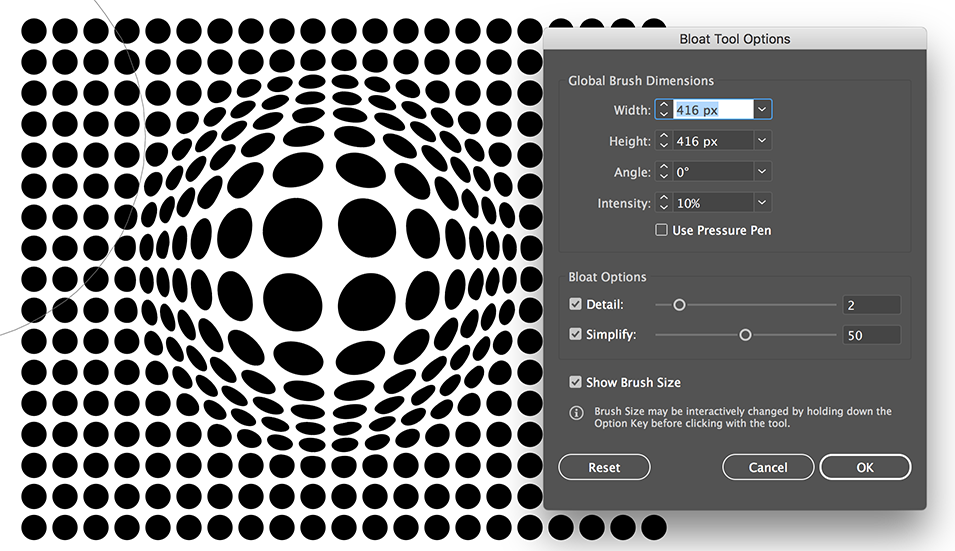
The Liquify tool you used was the Bloat Tool

Translate
Report
Community guidelines
Be kind and respectful, give credit to the original source of content, and search for duplicates before posting. Learn more
community guidelines
Community Expert ,
Jan 04, 2018 Jan 04, 2018

Or use the Bloat Tool (carefully)

Bloat tool.png

Translate
Report
Community guidelines
Be kind and respectful, give credit to the original source of content, and search for duplicates before posting. Learn more
community guidelines
New Here ,
Jan 05, 2018 Jan 05, 2018

Thankyou Tom, Monika and John. Most helpful. I'll give that a shot. I'm presuming that is in photoshop?

Kindest Paul

Translate
Report
Community guidelines
Be kind and respectful, give credit to the original source of content, and search for duplicates before posting. Learn more
community guidelines
Community Expert ,
Jan 05, 2018 Jan 05, 2018

It is all in Illustrator.

Translate
Report
Community guidelines
Be kind and respectful, give credit to the original source of content, and search for duplicates before posting. Learn more
community guidelines
New Here ,
Jan 05, 2018 Jan 05, 2018
LATEST

Appreciated Ton.

Translate
Report
Community guidelines
Be kind and respectful, give credit to the original source of content, and search for duplicates before posting. Learn more
community guidelines