
Participant
September 17, 2010
Answered

any way to get Illustrator CS5 to display full screen mode like Photoshop?

  • September 17, 2010
  • 3 replies
  • 84758 views

Is there any way to get Illustrator's screen modes to behave like Photoshop's screen modes?

One of the things I like most about Photoshop is the way it toggles from standard screen mode to "full screen with menu bar" to just "full screen".

For example, in Photoshop's standard mode, the window is no bigger than the size of the canvas. Why can't Illustrator do that?

And, is there anyway to get Illustrator CS5 to display the full screen mode where the background outside the artboard or canvas is black instead of white. Working in Illustrator for long hours, it would much easier on my eyes if the surrounding background could be black like in Photoshop.

Thanks very much in advance for any help,

- Nick
This topic has been closed for replies.
Correct answer Larry G. Schneider

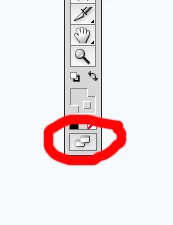
At the bottom of the Tool bar is a toggle button (F) which will change the Screen Mode.

3 replies

JeanetteLW
Participant
August 6, 2018

In the new illustrator you can go to "view" and at the bottom is full screen mode

Monika Gause
Community Expert
Community Expert
August 6, 2018

JeanetteLW  schrieb

In the new illustrator you can go to "view" and at the bottom is full screen mode

I don't see that in mine.

Also: this question has been posted 8 years ago.

Monika Gause
Community Expert
Community Expert
September 17, 2010

Documents and their sizes are somewhat different in Photoshop and Illustrator. Illy has one big document, art boards only define areas that will be printed. You can't define a background color in Illy. If you want to have something black, you'll have to create an object with a black fill.

Toggle between screen modes in Illy by hitting F

Sasha-Lee
Participant
September 22, 2015

OMG you just saved my life! Thank youuu!!

Larry G. Schneider
Community Expert
Larry G. SchneiderCommunity ExpertCorrect answer
Community Expert
September 17, 2010

At the bottom of the Tool bar is a toggle button (F) which will change the Screen Mode.