
Known Participant
October 17, 2023
Question

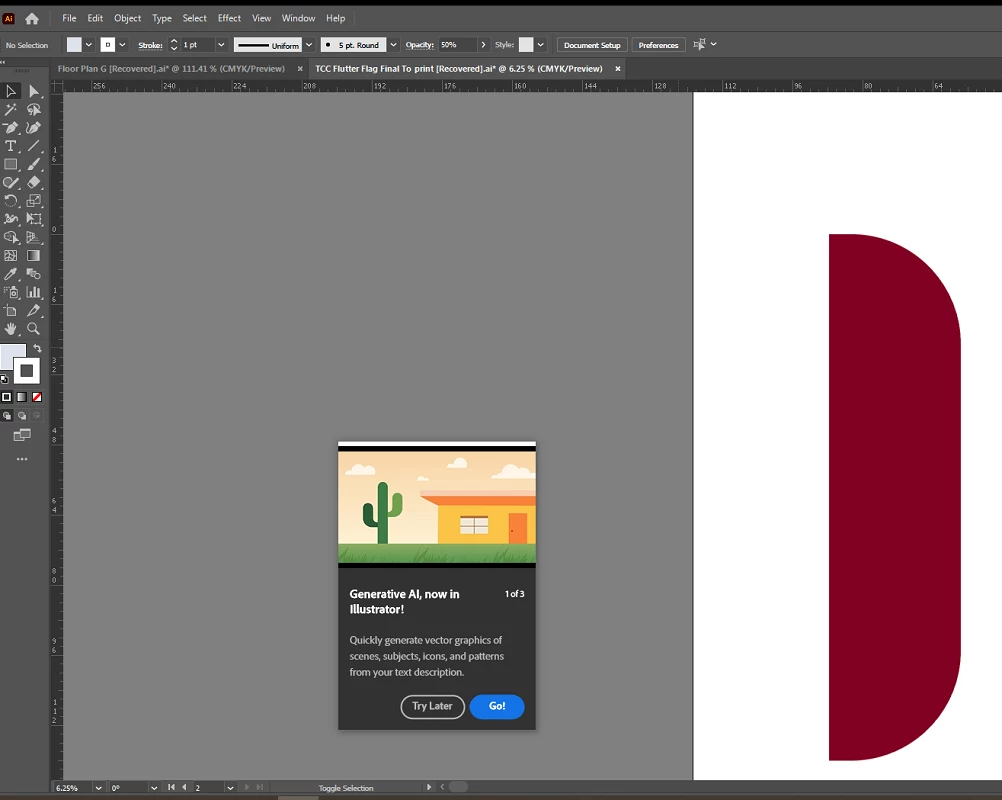
Any way to stop the "Generative AI" prompt from popping up?

  • October 17, 2023
  • 27 replies
  • 50033 views

EDIT: since it seems this might legitimately be a bug, I recommend seeing see my latest post on this thread for a Uservoice request someone else has created. If you're still experiencing this issue, please go to the Illustrator Uservoice forum and upvote/support that post.

I'm guessing this is just a bug or an inescapable prompt with the new program updates, but in the off chance ... Is there any way to get this "Generative AI, now in Illustrator!" to permanently go away? I've run through it with the "Go!" option multiple times, and I've even fiddled around with generating stuff, but it still shows up multiple times a day as if I haven't. It keeps popping up over parts of files I'm working on and interrupting me. I think it's been 3-5 times today alone. Resetting preferences (or not resetting them) makes no difference. I'm using Illustrator 28.0.


27 replies

Inspiring
November 28, 2023

It's just so annoying, Adobe: STOP IT!

Participating Frequently
November 20, 2023

I am also experiencing this nagging pop up. It is intrupting my work. Clicking "try it later" does not solve it. It comes back after reopening Illustrator and using some tools, like the shape tool.

Lavish_Moonlight0D4C
Inspiring
November 3, 2023

This is quite annoying and i too want this gone. I've "tried it out" and it still pops up, mostly when using the move tool

Anubhav M
Community Manager
Community Manager
November 3, 2023

Hello @howlaman,

We understand that encountering technical issues can be frustrating. We are here to help and would like to suggest trying to reset Illustrator's preferences as described in this article (https://adobe.ly/3SpJTgY).
Disclaimer: Please note that resetting preferences will remove all custom settings, and Illustrator will launch with the defaults. You may save a backup of these settings from the location mentioned in the article. 


If you don't mind, could you please follow the steps and share your observations with us? We appreciate your time and effort in helping us resolve this issue.


Looking forward to hearing from you.


Thanks,

Anubhav

howlamanAuthor
Known Participant
November 6, 2023

Hello - Resetting preferences does not make any difference to this, as stated in my initial post. If anything, it shows up more frequently after that.

Participant
November 3, 2023

I think I got it to turn off by unchecking, "Enable Content Aware Defaults" from the settings-general preferences.

Monika Gause
Community Expert
Community Expert
November 3, 2023

That will only turn off default cropping of images, default freeform gradient stops, default puppet warp handles.

Egor Chistyakov
Inspiring
October 20, 2023

Please upvote this bug report, if it seems like the same problem:
https://illustrator.uservoice.com/forums/601447/suggestions/47366600

howlamanAuthor
Known Participant
October 20, 2023

Thanks for the response. I believe I did already upvote that post; looks like this is giving a lot of people trouble! However, it seems their complaint is different than mine, just for the same AI Generator prompt. While they mention that the prompt does not permanently go away, their issue is that it locks up their File - Open options on their Mac. My complaint is about the prompt itself reocurring multiple times a day, usually right under my cursor and interrupting my workflow. Since I am on Windows 10, I do not have a Mac to see if I can replicate the problem this user is facing.

letsbff
Participant
October 20, 2023

This is incredibly annoying and no amount of adjusting preferences makes it go away. Adobe, please stop spamming your PAYING users with ads for features they never asked for.

Siansonea
Participating Frequently
January 15, 2024

A thousand times this. I am SO tired of in-app ads interrupting my workflow. If I want to know about new features, it's not while I'm working on something else. I go to YouTube for that. Every time I get interrupted with some Clippy-esque prompt to try some new feature (while still dealing with performance and quality of life bugs that are decades old) it makes me want to throw my computer across the room. 

Kurt Gold
Community Expert
Community Expert
October 17, 2023

Not quite sure if it helps, but you may try to disable the "Show Rich Quick Infos" option in the general section of the application preferences.


howlamanAuthor
Known Participant
October 17, 2023

Thanks for the reply - I did have tool tips disabled. I can try enabling/disabling again to see if that helps. Sometimes my preferences do turn on rich tool tips even when the normal Show Tool Tips is off, and I can't alter it without enabling them overall first.

howlamanAuthor
Known Participant
October 18, 2023

I have confirmed that adjusting Tool Tips does not affect this. Normal Tool Tips and Rich Tool Tips are both off, and it interrupted again today after several minutes working in the program, inconventiently right under my cursor.