Participant
June 22, 2022
Answered

Application Language Changed to French in Illustrator—Why?

  • June 22, 2022
  • 2 replies
  • 1915 views

My Illustrator app is now listing assets and using spell checker to check for mistakes according to the French language, but I didn't change any of my settings, and my language in my CC app is English... What do I need to fix, preferences-wise?


Any help is appreciated!
    This topic has been closed for replies.
    Correct answer Anubhav M

    Hello @km_masters,


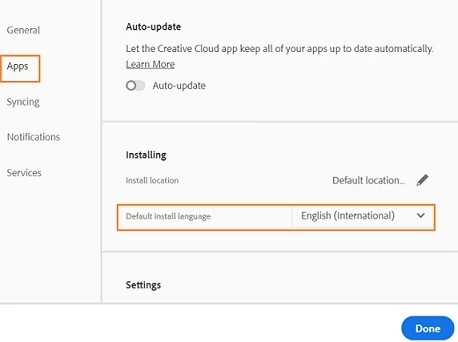
    Thanks for confirming that. I would request you to try the following steps to set the preferred language and reinstall Illustrator:

    1. Open the Creative Cloud desktop app.
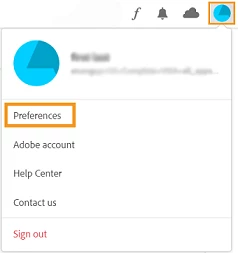
    2. Select the Account icon in the upper right, and then select Preferences.
       

    3. Select Apps in the sidebar.
    4. Select a language from the Default install language list.
    5. Select Done to apply your changes.
    6. Finally, uninstall and reinstall Illustrator and check if it works as expected.


    Looking forward to hearing from you.


    Regards.

    2 replies

    Anubhav M
    Community Manager
    Community Manager
    June 22, 2022

    Hello @km_masters,


    Sorry to hear about this experience. I would request you to check the assigned language for text (https://helpx.adobe.com/si/illustrator/using/spelling-language-dictionaries.html) and share your observations.


    Looking forward to hearing from you.


    Thanks,

    Anubhav

    Participant
    June 22, 2022

    Anubhav,


    Thank you for your assistance! I was able to adjust my spell checker using the "Show Options" on my Character panel, thank you! My swatches and other windows are still in French... see photo attached. 'Hyphenation' is set to 'English (USA)".

    Anubhav M
    Community Manager
    Anubhav MCommunity ManagerCorrect answer
    Community Manager
    June 23, 2022

    Hello @km_masters,


    Thanks for confirming that. I would request you to try the following steps to set the preferred language and reinstall Illustrator:

    1. Open the Creative Cloud desktop app.
    2. Select the Account icon in the upper right, and then select Preferences.
       

    3. Select Apps in the sidebar.
    4. Select a language from the Default install language list.
    5. Select Done to apply your changes.
    6. Finally, uninstall and reinstall Illustrator and check if it works as expected.


    Looking forward to hearing from you.


    Regards.

    Peru Bob
    Community Expert
    Community Expert
    June 22, 2022

    I've moved this from the Using the Community forum (which is the forum for issues using the forums) to the Illustrator forum so that proper help can be offered.