
AntCrescendo
Participating Frequently
September 8, 2023
Answered

Apply a gradient to just one word within a sentence

  • September 8, 2023
  • 3 replies
  • 861 views

Hello, does anyone know how to apply a gradient to just one word within a sentence, while keeping the rest of the sentence in a solid color? I want the text to remain editable. I'm already familiar with outlining the text and adding a gradient effect to the shape. 


I would appreciate any guidance or advice regarding my question.


Thanks 🙂
This topic has been closed for replies.
Correct answer Mike_Gondek10189183

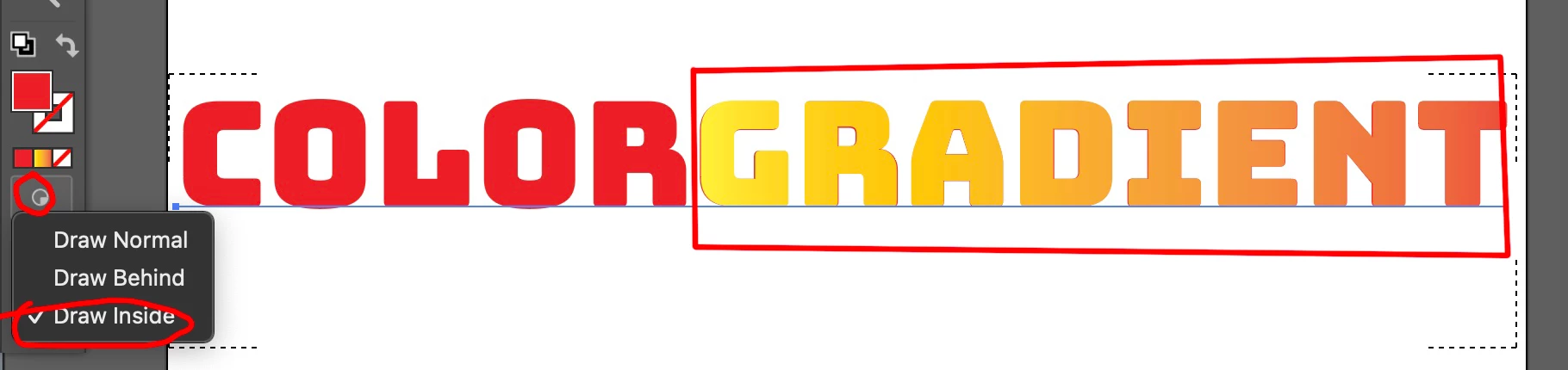
Unfortunately you cannot set a gradient at the character level in the appearance palette. 


Select the type to draw inside. 

Make a rectangle and fill with a gradient (i drew a red stroke to show where I made).

That shape gets sucked into 

Set back to Draw normal


3 replies

Monika Gause
Community Expert
Community Expert
September 8, 2023

Is it just one line of text? Or several?


For just one line you could set up the gradient carefully

Kurt Gold
Community Expert
Community Expert
September 8, 2023

You can do it with an additional fill in the Appearance palette.


Download sample Illustrator file:


Gradient applied only to one word 


Mike_Gondek10189183
Community Expert
Mike_Gondek10189183Community ExpertCorrect answer
Community Expert
September 8, 2023

Unfortunately you cannot set a gradient at the character level in the appearance palette. 


Select the type to draw inside. 

Make a rectangle and fill with a gradient (i drew a red stroke to show where I made).

That shape gets sucked into 

Set back to Draw normal


AntCrescendo
Participating Frequently
September 8, 2023

@Mike_Gondek10189183 Your the man! thanks!

Mike_Gondek10189183
Community Expert
Community Expert
September 8, 2023

Sorry there is not a better way. I live & breathe using the appearance palette, is probably most under utilized item in Illustrator, and unfortunately, you cannot do there.