
Participating Frequently
May 21, 2024
Question

Apply to All checkbox missing in Adobe Illustrator v28.5 for Windows

  • May 21, 2024
  • 7 replies
  • 1705 views

The "Apply to All" checkbox is missing.  This is a huge problem when relinking multiple images (sometimes hundreds in my case) automatically for imposition for large format printing.  
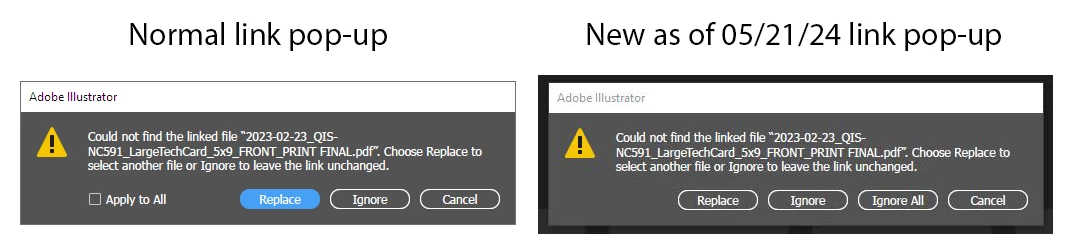
This issue came up last year and it looks like it has reappeared with this latest version of Adobe Illustrator v28.5, released 4 days ago.  Adobe - please fix this bug as soon as you can.  All my templates are affected by this and instead of one global replacement, I now much click for every linked instance.  Not much of a problem when there's only one or two relinking clicks required, but when I need to click "Replace" over 100 times, this is a time killer.  Please see if you can fix this bug.  Thanks.

7 replies

johnm32819307
Participant
March 17, 2025

Adobe is going backwards with the software. Does anyone working there actually use the software?

kkpebatz
Participant
August 21, 2024

If you have to relink a multiple page document that checkbox is not helping. In print production is a big problem. please help us.

Ton Frederiks
Community Expert
Community Expert
August 20, 2024
Participating Frequently
August 20, 2024

Glenn270441875265, perfectly stated and shown by your screen captures! Thanks for making note of this VERY frustrating (and completely unhelpful!) change. Adding back that handy little “Apply to all” check box will hopefully squash this issue. It’s going to take me SO much extra time updating any stepped layouts, without a fix... not efficient.

Please fix ASAP, Adobe!


Adding that checkbox is VERY LITERALLY the difference between 10 minutes of tediously unnecessary clicking, and the former 10 seconds of relinking all files in a single click... My administrator will not be updating any of our other Macs with this update until this is fixed!

Participating Frequently
June 14, 2024

Adobe - please let me know if you are working on restoring the "Apply to All" check box.  Nothing in the new versions will do what this check box did.  All my templates have placeholder images that are duplicated multiple times, as many as 200 or more per press sheet.  I simply replace the placeholder image with a new file (different name) of the same size, check the "Apply to All" box ... and it automatically populates the entire page with the new image.  One click does it all ... but your new version does not allow this and I need to click hundreds of times to do what one click used to do.   Please please please put this "Apply to All" check box back to where it was.  

Anubhav M
Community Manager
Community Manager
May 24, 2024

Hello everyone,


Thank you for your feedback, and I apologize for any inconvenience. Our team is actively investigating the issue and will share more information as soon as possible. We appreciate your patience during this time.


Thanks,
Anubhav

Participating Frequently
May 24, 2024

Thank you.  I look forward to seeing that "Apply to All" checkbox again.

Anubhav M
Community Manager
Community Manager
May 21, 2024

Hello @Glenn270441875265,

I'm sorry to hear about your experience. Would you mind checking the "Search for Missing Links in this folder" box when selecting your missing asset after clicking on the Replace button to see if it helps?


Looking forward to hearing from you.


Thanks,

Anubhav

Participating Frequently
May 22, 2024

I'm also having a lot of trouble with the same problem.
MacOS 13.6.7
Illustrator 28.5


There is also a similar bug report for User Voice.
please confirm.


https://illustrator.uservoice.com/forums/601447-illustrator-desktop-bugs/suggestions/48434444-linked-files-dialog-missing-apply-to-all-checkbo


Thanks.

Ton Frederiks
Community Expert
Community Expert
May 22, 2024

製版Mac132673417sos8

Yes - that is how I do mine as well ... but also on a larger scale.  Sometimes my images are duplicated 200+ times and they automatically would re-link with the "Apply to All" option.  Now I need to click REPLACE  and click on the file hundreds of times.  I hope they fix this soon.


As a temporal workaround you could give the new image the same name as the old one.