
Participant
February 2, 2021
Answered

Appyling an envelope distort to a clipping mask?

  • February 2, 2021
  • 1 reply
  • 2727 views

I am trying to apply an envelope distort effect to a clipping mask ( of a jpeg image) and I will not let me.

What am I doing wrong. 


I have tried to expand the clipping mask and I have tried to do it in isolation mode. None of these work. 


Each time it just comes up saying it contains objects that cannot be distorted but I have seen someone else do this succesfully on their illustrator so what is different about mine? 
This topic has been closed for replies.
Correct answer Kamarudheen CK

You have two options,

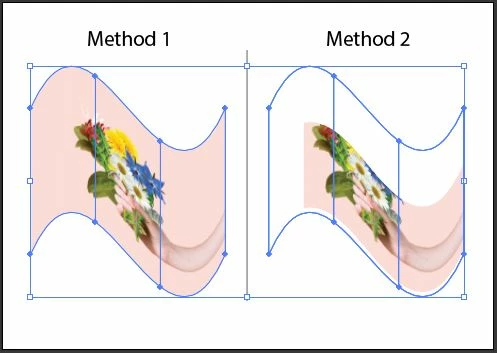
1. Once you imported the image, 'embed' it first, then go to 'Layers', select name <image> in the same layer by collapsing the layer name arrow down, then try the envelope distort, it will work. (This option will provide an accurate result for envelope distort than making clipping mask) *see attached

2. If you are clipping masked the images already, then embed it by going in the isolation mode, them exit isolation, and Distort it ( the difference between the two methods are attached)

So I suggest you crop the image and do the distortion than clipping mask it.


I hope this is helpful.

1 reply

Kamarudheen CKCorrect answer
Inspiring
February 2, 2021

You have two options,

1. Once you imported the image, 'embed' it first, then go to 'Layers', select name <image> in the same layer by collapsing the layer name arrow down, then try the envelope distort, it will work. (This option will provide an accurate result for envelope distort than making clipping mask) *see attached

2. If you are clipping masked the images already, then embed it by going in the isolation mode, them exit isolation, and Distort it ( the difference between the two methods are attached)

So I suggest you crop the image and do the distortion than clipping mask it.


I hope this is helpful.