kandicer12299436
Participant
August 29, 2022
Answered

arc radius

  • August 29, 2022
  • 4 replies
  • 2334 views

Hi,


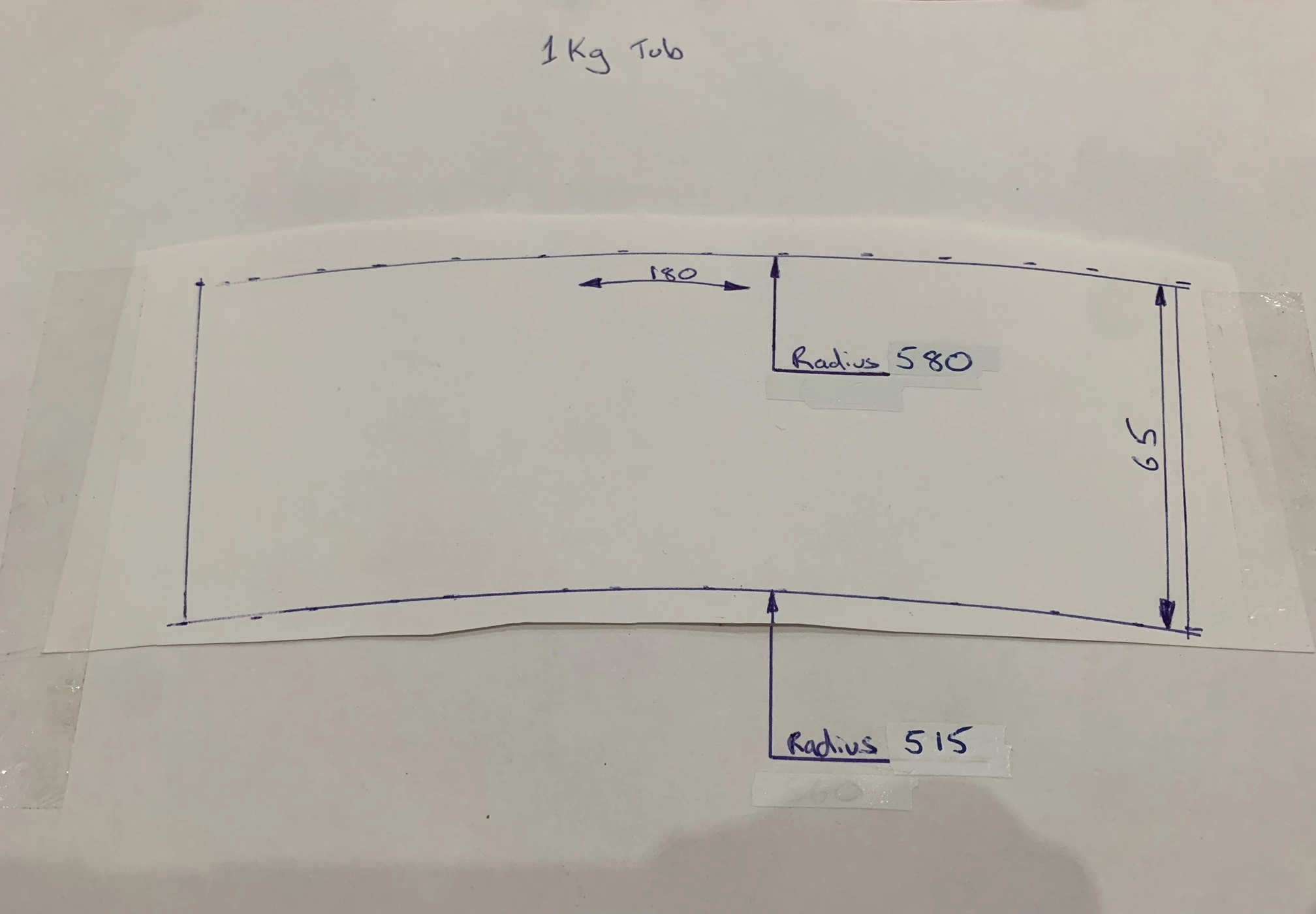
I have been given a lable to draw for a sticker.  I have been given the arc radiues but I'm unsure how to input this value to create the art?  Thank you! 
This topic has been closed for replies.
Correct answer Disposition_Dev

figure out what units that drawing is supposed to represent (because there are no units there)...


Then grab your circle tool and click on the drawing area. In the dialog that opens, input 1030pt into the "width" and "height" fields. then click ok. now you have a circle with a radius of 515pt (use whatever unit you want.. pixels are the same as points.. you can also input other units like mm, inches, etc.


then select that circle, and go to the Object menu, and select Path > Offset Path. Then enter 65 [units] into the dialog and click ok. Now you'll have two circles with radii that match the scale of the drawing. then you just need to figure out the width and trim the rest of the circles.

4 replies

Met1
Legend
August 29, 2022

Bored, me? No...


Disposition_Dev
Legend
August 29, 2022

for some reason i have a strong urge to automate the drawing of that diagram... But i can't think of a reasonable use case for a function that draws that. =(

Jacob Bugge
Community Expert
Community Expert
August 29, 2022

Kandice,


In addition to what Dilliam said, I believe you need a clarification about the sides of the label:


Are they really meant to be parallel, as in drawing an Arch for a flat or cylindrical object with a more curved bottom, or directed towards the centre of the circle(s), as in drawing an Arc for a normal conical object (icecream cone rather than bottleneck)?


In either case, the horizontal distance between the sides at top/larger circle is 179.2785, in other words quite close to the 180. You can use 180 (or 179) for the width.


For the given (unknown) unit, you can proceed as follows to create the label with artwork in one go:


For a normal Arch (without the more curved bottom, which you can apply afterwards, if you must, otherwise you need a customized way which will alsi look funny (maybe both hah hah and peculiar)), you can create a rectangle that is 180 (or 179) wide and 65 tall, then use that as the boundary for the label with or without a stroke, then create the artwork unbent, then Group and apply Arch with a Bend of 10%.


For an Arc, you can create a rectangle that is 160 (or 159) wide and 65 tall, then use that as the boundary for the label with or without a stroke, then create the artwork unbent, then Group and apply Arc with a Bend of 10%.


kandicer12299436
Participant
August 29, 2022

Thanks so much I really appreciate this.  The units are mm!  But I think I can figure it out based on all the help I have received on this post. Forever grateful!

Jacob Bugge
Community Expert
Community Expert
August 30, 2022

For my part you are welcome, Kandice.


I have assumed that you need to create both the label and the artwork bent to match and fit.


Hence the ways to do everything in one go, with everything bent in one and the same transformation, either Warp>Arch or Warp>Arc, my guess being the latter.


Disposition_Dev
Disposition_DevCorrect answer
Legend
August 29, 2022

figure out what units that drawing is supposed to represent (because there are no units there)...


Then grab your circle tool and click on the drawing area. In the dialog that opens, input 1030pt into the "width" and "height" fields. then click ok. now you have a circle with a radius of 515pt (use whatever unit you want.. pixels are the same as points.. you can also input other units like mm, inches, etc.


then select that circle, and go to the Object menu, and select Path > Offset Path. Then enter 65 [units] into the dialog and click ok. Now you'll have two circles with radii that match the scale of the drawing. then you just need to figure out the width and trim the rest of the circles.

kandicer12299436
Participant
August 29, 2022

Thanks so much! I really apprectiate this!  The units are mm.

kandicer12299436
Participant
August 29, 2022

Hi,


I have been given a label to draw for a sticker.  I have been given the arc radius's but I'm unsure how to input this value to create the art?  Thank you!
