
Known Participant
June 28, 2023
Question

Art board printing to Framemaker

  • June 28, 2023
  • 2 replies
  • 385 views

Dear all,

My image in Illustrator does not show the correct art board in Framemaker.
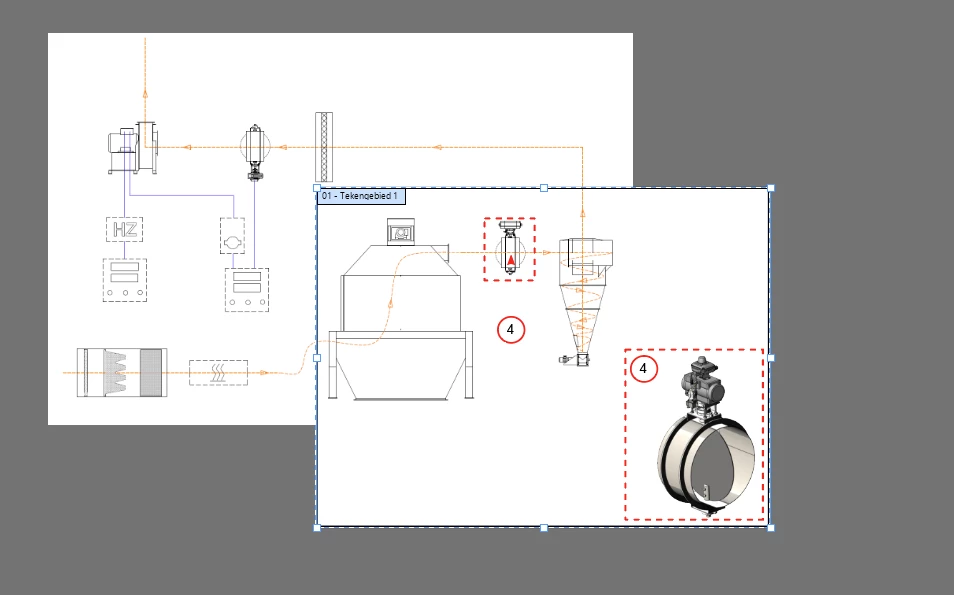
 

The square on the right side ("01 Tekengebied") should be my image in Framemaker. But in Framemaker it shows everything, so also on the left side the image.

I saved as .svg because I want it to be editable. 

I've tried and export it as .svg with the art board option to print.


I only want the drawing that's in my art board and nothing else. How do I do that? I've been watching tutorials the whole day, but can't find it.

This topic has been closed for replies.

2 replies

Known Participant
June 28, 2023

PLease remove my post. I'm such an idiot...

I got it... Sorry..

Ton Frederiks
Community Expert
Community Expert
June 28, 2023

I am afraid I cannot remove your post.

Don't worry about making a question. Maybe if you describe your solution it will help others.

Ton Frederiks
Community Expert
Community Expert
June 29, 2023

I must double check today, but I think it didn't work because I have to 'save as' .ai file. I saved as .svg file and then it stayed linked to Inkscape.

I've tried two files yesterday to 'save as' .ai file, imported this .ai file into Framemaker and then it showed the artboard image.

I think the problem is within the .svg and the fact that I used to use Inkscape. With my new Framemaker version I get black spots in my images.


Therefore I'm trying to solve this with Illustrator. The black spots is resolved but now the problem was how to import the correct image into Framemaker. 

I think that I have to import .ai file into Framemaker instead of .svg file.


Hopefully this will clarify what my problem is or was 🙂


If the .ai file works, that would be fine, you can then always edit the original. But there are different ways to save the result as SVG. Save As..., Export > Export As and Export for Screens... 

Export for Screens has the most modern code.

Ton Frederiks
Community Expert
Community Expert
June 28, 2023

Can you try to make a rectangle the same size as your 01 Tekengebied, select all and choose Object > Clipping Mask > Make and export the artboard as SVG using Export for Screens?