
Participant
June 24, 2025
Answered

Artboards do not populate in Artboard Panel

  • June 24, 2025
  • 1 reply
  • 283 views

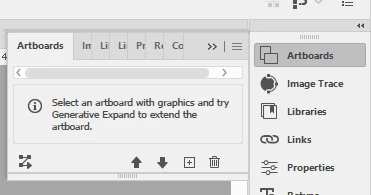
After recent Illustrator update (last week), my artboards no longer show up in the Artboard panel. Instead, where the artboard list would normally populate, this is what appears. I have "Show Artboards" selected and I have not changed anything in my Workspace settings. Any help would be greatly appreciated. 


Correct answer Anubhav M

Hello @beckyf7157061,

Could you try expanding the Artboards panel horizontally to see if it helps?

Looking forward to hearing from you.
Anubhav

1 reply

Anubhav M
Community Manager
Anubhav MCommunity ManagerCorrect answer
Community Manager
June 25, 2025

Hello @beckyf7157061,

Could you try expanding the Artboards panel horizontally to see if it helps?

Looking forward to hearing from you.
Anubhav

Participant
June 25, 2025

Hey, that worked. I'm sorry I didn't think to do that. I guess because until this recent update, I never had to expand it. Appreciate your help!