
Participant
August 3, 2024
Answered

Artefacts/Outlines in Scatter Brush

  • August 3, 2024
  • 2 replies
  • 957 views

I have a problem with scatter brushes in particular. When I use them in my cloud document, it seems to work perfectly fine; i can also export to .png no problem.


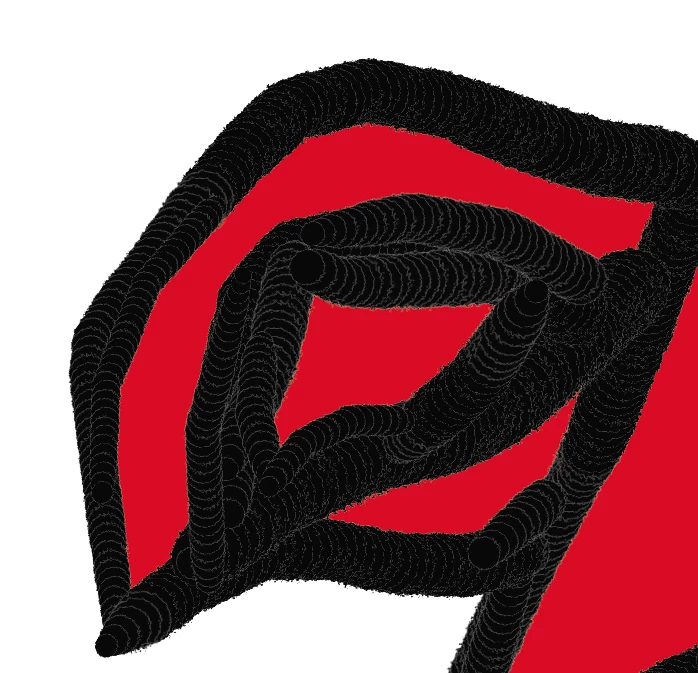
However, when I export to an .ai on my computer or as .pdf the brush get these weird artefacts like there is an outline drawn around each singular dot (see image). It's supposed to be all black.


I was able to fix it once by re-colouring the lines and contours, but it just keeps re-appearing once I do anything else. I need to share this document with others so it's important that it works when exporting...


Can anyone help me find the problem? Thanks in advance 🙂
This topic has been closed for replies.
Correct answer Rosalie2435454443zj

Edit: I found a solution. Not sure if this was obvious, but previously I had used a pixel-based image from Photoshop, imported and rasterized it, then turned it into a scatter or art brush. I fixed it by turning the shape into a vector shape first (by tracing the image), adjusting the traced image, then turning it into a brush. Now there's no lines or overlaps when exporting.

2 replies

Rosalie2435454443zjAuthorCorrect answer
Participant
August 9, 2024

Edit: I found a solution. Not sure if this was obvious, but previously I had used a pixel-based image from Photoshop, imported and rasterized it, then turned it into a scatter or art brush. I fixed it by turning the shape into a vector shape first (by tracing the image), adjusting the traced image, then turning it into a brush. Now there's no lines or overlaps when exporting.

Monika Gause
Community Expert
Community Expert
August 3, 2024

Can you please share a file that contains the brush? Or better: a line drawn with the brush, so that we see what kinds of appearances are involved?


Change the file extension to PDF so you can upload it here.

Participant
August 4, 2024

I've attached a pdf with the brushes.

After changing my gpu settings, this seems to happen only after export - before export and in pngs, it looks like this (as it should):

And it only happens with my own brushes, in the attached file I have used a calligraphy (I think) brush preset for comparison.

Monika Gause
Community Expert
Community Expert
August 4, 2024

Your brush has a raster object as the base object, and that object is CMYK, so it has anti-aliasing along the edges. I'm only seeing the artifacts in certain zoom levels.


This could perhaps be better, when you set the element to multiply, but then the image you paint might or might not look as intended. Or you could try a bitmap (1 bit) image as the base element.


What you are doing there will create a huge, complex file which might lead to issues with the final drawing and the output of the file.