Participant
September 20, 2020
Answered

Artifacts on wavy lines in Illustrator

  • September 20, 2020
  • 1 reply
  • 456 views

I have a wavy line that I originally draw with the brush tool and have edited a bunch with the anchor point tool. When I decrease the thickness of the line the artifacting goes away, but when I increase the thickness the artifacting appears. It isn't that visible but it frustrates me and makes the edges of the lines feel rougher than I would like them to. I have tried messing with some of the settings mentioned in other posts, but it may be a different issue than what I'm experiencing.


{Renamed by MOD}

 

This topic has been closed for replies.
Correct answer Srishti Bali

Hi Allison,


Thanks for reaching out. The screenshot you shared above are not working. Could you please insert the images into the body of the post. 


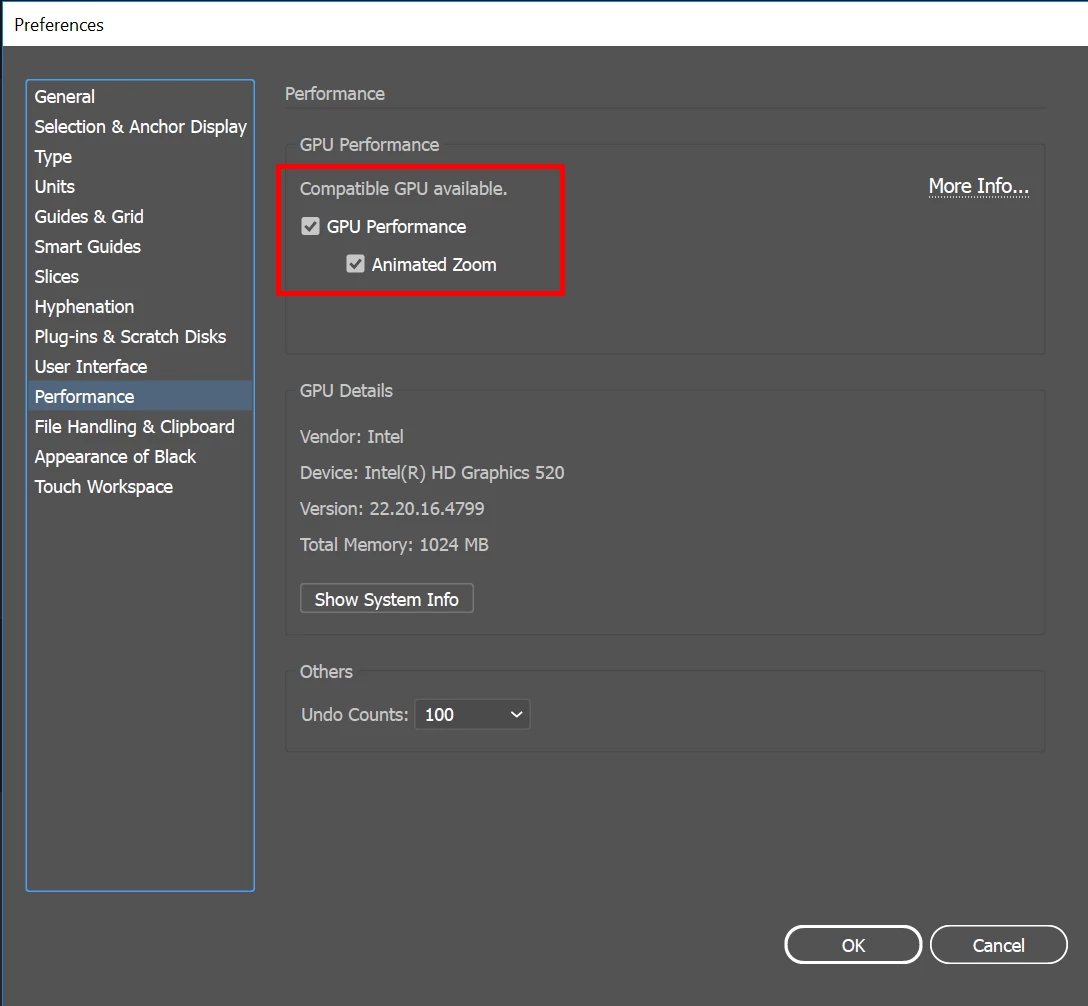
You may also try turning off GPU performance from Illustrator Preferences (CMD/ CTRL + K). 


Let us know if this helps or if you have any further questions, we'd be happy to help.


Regards,

Srishti

1 reply

Srishti Bali
Community Manager
Srishti BaliCommunity ManagerCorrect answer
Community Manager
September 20, 2020

Hi Allison,


Thanks for reaching out. The screenshot you shared above are not working. Could you please insert the images into the body of the post. 


You may also try turning off GPU performance from Illustrator Preferences (CMD/ CTRL + K). 


Let us know if this helps or if you have any further questions, we'd be happy to help.


Regards,

Srishti