
Exit
  • Global community
    • Language:
      • Deutsch
      • English
      • Español
      • Français
      • Português
  • 日本語コミュニティ
  • 한국 커뮤니티
0

Artwork turns to yellow box

New Here ,
Nov 09, 2022 Nov 09, 2022

Not all the art is changing but when the file is saved, with links to art like I always do it just started to do this and the art is in yellow boxes, no prompt as if the art is not linked and in the bike one it saved one with box and the other is fine. Running 2023 Ai on a Mac Studio, I uninstalled Ai and reinstalled, restarted, and nothing.
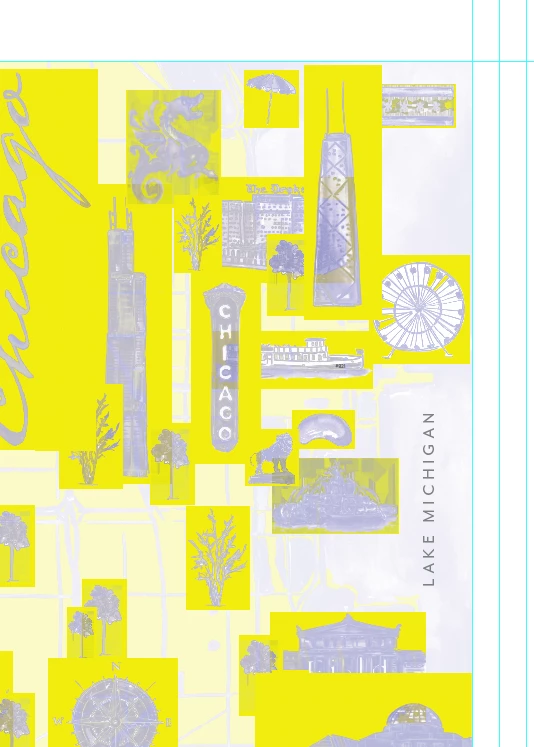

 

Screen Shot 2022-11-09 at 6.24.41 PM.pngScreen Shot 2022-11-09 at 6.28.02 PM.png

TOPICS
Bug , Performance
566
Translate
Report
Community guidelines
Be kind and respectful, give credit to the original source of content, and search for duplicates before posting. Learn more
community guidelines

correct answers 2 Correct answers

Community Expert , Nov 10, 2022 Nov 10, 2022
Translate
Adobe Employee , Nov 18, 2022 Nov 18, 2022

Hi @eight21studios,


We are glad to inform you that this issue has been fixed in Illustrator v27.0.1.


Note: The files which are corrupted will not get fixed. To fix them, first, update to v27.0.1 and ensure you relink all the images in order to resolve the issue in the existing files. Let us know if the issue persists after doing this.


Thanks,

Anshul Saini

Translate
Adobe
Community Expert ,
Nov 10, 2022 Nov 10, 2022

According to user voice this has been fixed in a Prerelease build. https://illustrator.uservoice.com/forums/601447-illustrator-desktop-bugs/suggestions/45228802-illust...

Translate
Report
Community guidelines
Be kind and respectful, give credit to the original source of content, and search for duplicates before posting. Learn more
community guidelines
New Here ,
Nov 10, 2022 Nov 10, 2022

I am running 27.0 on a new Mac Studio, and "up to date" and this is currently happening.

Translate
Report
Community guidelines
Be kind and respectful, give credit to the original source of content, and search for duplicates before posting. Learn more
community guidelines
New Here ,
Nov 10, 2022 Nov 10, 2022

Appears it is NOT fixed and has resurfaced.


Screen Shot 2022-11-10 at 5.37.14 PM.png

Translate
Report
Community guidelines
Be kind and respectful, give credit to the original source of content, and search for duplicates before posting. Learn more
community guidelines
Community Expert ,
Nov 10, 2022 Nov 10, 2022

Well, did you test the Prerelease version mentioned in Uservoice?

Translate
Report
Community guidelines
Be kind and respectful, give credit to the original source of content, and search for duplicates before posting. Learn more
community guidelines
Adobe Employee ,
Nov 18, 2022 Nov 18, 2022
LATEST

Hi @eight21studios,


We are glad to inform you that this issue has been fixed in Illustrator v27.0.1.


Note: The files which are corrupted will not get fixed. To fix them, first, update to v27.0.1 and ensure you relink all the images in order to resolve the issue in the existing files. Let us know if the issue persists after doing this.


Thanks,

Anshul Saini

Translate
Report
Community guidelines
Be kind and respectful, give credit to the original source of content, and search for duplicates before posting. Learn more
community guidelines