Exit
  • Global community
    • Language:
      • Deutsch
      • English
      • Español
      • Français
      • Português
  • 日本語コミュニティ
  • 한국 커뮤니티
0

Asset export, save export settings

Participant ,
May 08, 2017 May 08, 2017

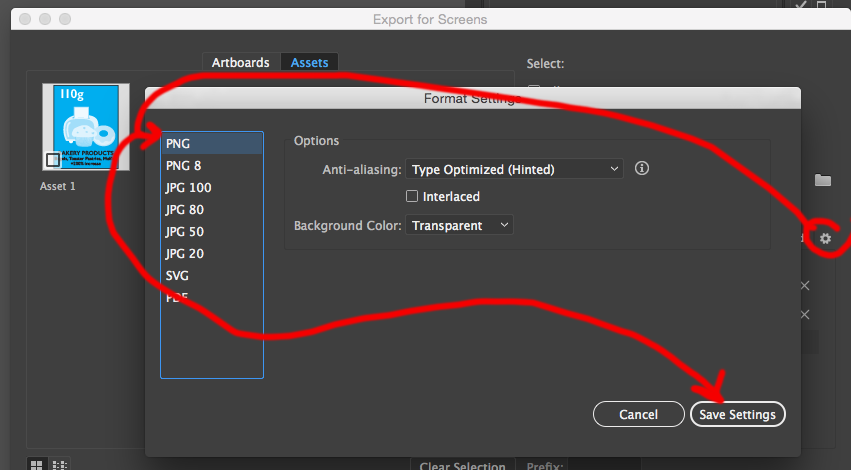
Anyone know how to save your export settings in asset export?

Would be a nice feature to recycle different settings later on.

Skärmavbild 2017-05-08 kl. 12.42.45.png

2.2K
Translate
Report
Community guidelines
Be kind and respectful, give credit to the original source of content, and search for duplicates before posting. Learn more
community guidelines

correct answers 1 Correct answer

Community Expert , May 08, 2017 May 08, 2017

What you highlighted in red, cannot be saved. You can though save most everything else

  • The names of your icons and selections are within the file
  • format settings for each of the format available, in the list by clicking save settings

Screen Shot 2017-05-08 at 10.14.10 AM.png

but sorry the items under the export settings headline cannot be saved to be used on other jobs.

Translate
Adobe
May 08, 2017 May 08, 2017

Hi Henrik,

Indeed a great suggestion. I would request you to put a feature request here: Illustrator Feature Request/Bug Report Form

Regards,

Om

Translate
Report
Community guidelines
Be kind and respectful, give credit to the original source of content, and search for duplicates before posting. Learn more
community guidelines
Community Expert ,
May 08, 2017 May 08, 2017

What you highlighted in red, cannot be saved. You can though save most everything else

  • The names of your icons and selections are within the file
  • format settings for each of the format available, in the list by clicking save settings

Screen Shot 2017-05-08 at 10.14.10 AM.png

but sorry the items under the export settings headline cannot be saved to be used on other jobs.

Translate
Report
Community guidelines
Be kind and respectful, give credit to the original source of content, and search for duplicates before posting. Learn more
community guidelines
Engaged ,
Dec 12, 2018 Dec 12, 2018

I cannot understand why these settings cannot be saved, or at least saved for each AI file. It is complete nonsense to have this as an application wide setting. Someone has not thought this through properly in terms of real world workflow.

I was recently working on icon sets for two separate clients, and often moved from one project to the other as feedback came in. I had reset the Export Asset savings each time, having had to make a separate note of what each project required. This is very inefficient, time consuming and error-prone, and it could so easily be fixed with the simple change of file-specific export settings.

Translate
Report
Community guidelines
Be kind and respectful, give credit to the original source of content, and search for duplicates before posting. Learn more
community guidelines
Community Expert ,
Dec 12, 2018 Dec 12, 2018
Translate
Report
Community guidelines
Be kind and respectful, give credit to the original source of content, and search for duplicates before posting. Learn more
community guidelines
Engaged ,
Dec 12, 2018 Dec 12, 2018

Thanks Monika - I'll add my vote..

Translate
Report
Community guidelines
Be kind and respectful, give credit to the original source of content, and search for duplicates before posting. Learn more
community guidelines
New Here ,
Aug 10, 2022 Aug 10, 2022
LATEST

long long overdue for professionals to save this. But development of many adobe apps stalled. 

Translate
Report
Community guidelines
Be kind and respectful, give credit to the original source of content, and search for duplicates before posting. Learn more
community guidelines