Participating Frequently
June 13, 2016
Answered

Auto outline Illustrator text on PDF save?

  • June 13, 2016
  • 2 replies
  • 20707 views

Is there a plug-in or setting that will automatically outline text found in Illustrator upon saving it as a PDF?

Thanks!

This topic has been closed for replies.
Correct answer d0nut247

If you want to output a pdf and automatically have the text turned to outlines, you can make yourself a new PDF Preset,

go to

Edit>

Adobe PDF Presets...>

then make a new preset, choose an initial format such as X-1a:2001

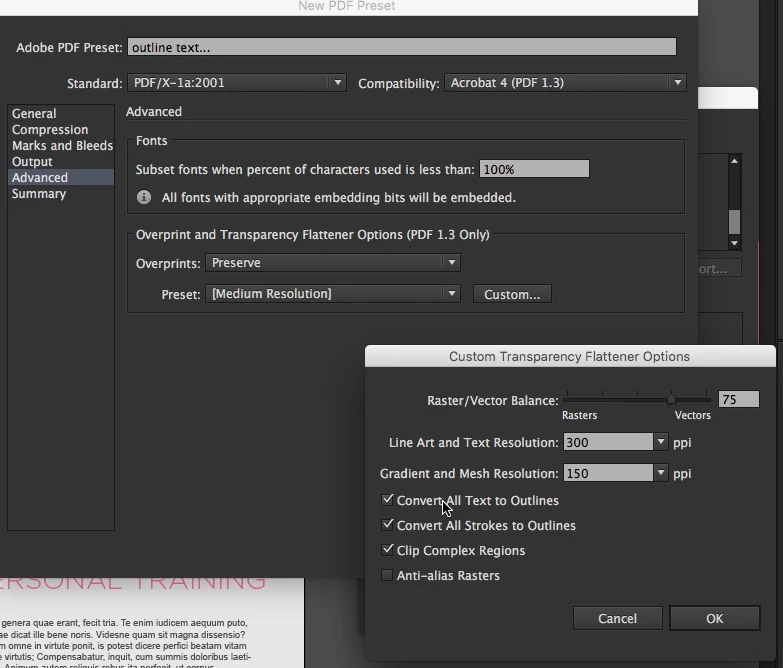
then under advanced tab, pick custom for transparency. and you can select to "convert all text to outlines"

set any other settings you'd usually want, and save it....
2 replies

d0nut247Correct answer
Inspiring
June 13, 2016

If you want to output a pdf and automatically have the text turned to outlines, you can make yourself a new PDF Preset,

go to

Edit>

Adobe PDF Presets...>

then make a new preset, choose an initial format such as X-1a:2001

then under advanced tab, pick custom for transparency. and you can select to "convert all text to outlines"

set any other settings you'd usually want, and save it....

Participating Frequently
June 13, 2016

None of the existing PDF profiles allow me to select an Overprint setting - it is greyed out. Currently on latest Adobe Illustrator CC.

Inspiring
June 13, 2016

choose the pdf x1/a:2001 bit from the 'Standard' drop down as shown in the screen grab, then the overprint menus become live. and you can make a custom option.

Monika Gause
Community Expert
Community Expert
June 13, 2016

apply the Effect > Path > Outline object to the live text.