Participant
September 27, 2024
Answered

Autosaved files won't open

  • September 27, 2024
  • 2 replies
  • 902 views

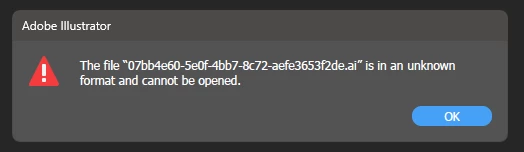
App crashed during an important project, I have my file handling already set to save ever two minutes, but the file in the data recovery autosave location is in an unkown formatt and cannot be opened.


I have renamed the file with a .ai but this doesn't work.


Is there a way to recover this file?


Many thanks.


Correct answer Anubhav M

Hello @33156968,

Thank you for sharing the file with us. Despite attempting to recover from the file, regrettably, there was nothing left to salvage. We understand this may not be the ideal outcome, and we apologize for any inconvenience caused.


Could you confirm if the file was saved on a network, removable drive, or a cloud-synced folder like Google Drive or Dropbox? Storing files in such locations can sometimes lead to corruption issues. To prevent this from happening in the future, we recommend saving your work locally first and then manually copying it to your desired backup location.


To avoid similar situations in the future, we advise saving multiple copies of your active work locally or saving them as cloud documents.

Please don't hesitate to reach out if you have any further questions or need assistance. We're here to help.


Thanks,

Anubhav

2 replies

Monika Gause
Community Expert
Community Expert
September 27, 2024

How do you open the Recovery file? When relaunching Illustrator after a crash, it should offer you to open it. Then you have to click on OK. It can still fail.


Do you have a backup of your file?

Recovery is NOT autosave. 

Do not bring yourself into a situation where the recovery is your only option.


Take this as a warning sign to develop a backup strategy. Save your file early. Save your file often. Save different versions. Save on different volumes. A power outage, a harddrive failure can otherwise ruin everything at any time.


September 27, 2024

Granted I should have saved the file more recently, not something I usually do. I do have a backup of the file just without the progress made on it. The autosave just goes to data recovery folder with the file path below.


C:\Users\archi\AppData\Roaming\Adobe\Adobe Illustrator 28 Settings\en_GB\x64\DataRecovery


If data recovery is not autosave then what is? Thats how it's set up on my prefernces and has sorted me out before as I was under the impression the file autosaves every 2 minutes, is this not correct?


Anubhav M
Community Manager
Anubhav MCommunity ManagerCorrect answer
Community Manager
September 27, 2024

Hello @33156968,

Thank you for sharing the file with us. Despite attempting to recover from the file, regrettably, there was nothing left to salvage. We understand this may not be the ideal outcome, and we apologize for any inconvenience caused.


Could you confirm if the file was saved on a network, removable drive, or a cloud-synced folder like Google Drive or Dropbox? Storing files in such locations can sometimes lead to corruption issues. To prevent this from happening in the future, we recommend saving your work locally first and then manually copying it to your desired backup location.


To avoid similar situations in the future, we advise saving multiple copies of your active work locally or saving them as cloud documents.

Please don't hesitate to reach out if you have any further questions or need assistance. We're here to help.


Thanks,

Anubhav
Anubhav M
Community Manager
Community Manager
September 27, 2024

Hello @strong_Whirl7998,

I am sorry to hear about your experience. Would you mind providing some details about the circumstances under which these files were saved or edited and the location of the files where they were stored?


Also, kindly share a link to the file after uploading to Dropbox/Google Drive/etc. so we can check it on our end. Although we cannot guarantee a successful recovery, we will try our best to do so.

Looking forward to hearing from you.


Thanks,

Anubhav

September 27, 2024

The file was saved, I worked on it (longer than I should have) without saving and then the app crashed.


I restarted the app but no recovery message came up so I resorted to the autosave file location, where this file was but I'm unable to open it.


I have attached the file link below.


https://drive.google.com/file/d/1DHwOLzkNU29SbtboY2fxMxfDrCSf10eI/view?usp=sharing 


Many thanks