md.dini52336411
New Participant
March 5, 2023
Answered

Bangla typing problem in illustrator cc.

  • March 5, 2023
  • 1 reply
  • 14063 views

Hi,

I'm troubled typing Bangla/Bijoy in my adobe illustrator cc-17 and cc20. I can type in other software eg. ms word, photoshop cs6.

I changed the preference>type>indiac option but still now facing this type of worst situation.


Correct answer Anubhav M

Hello @md.dini52336411,


Sorry to hear about this experience. If you are using a Windows computer, I would suggest you follow these steps to type in Bangla/Bengali in Illustrator:
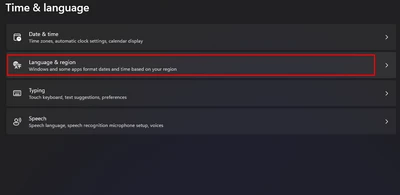
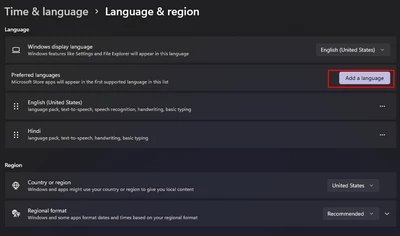
  • Open the Time and Language settings under Windows Settings and select Language & region:


  • Then click on the button to add a language. Use either Bengali (India) or Bangla (Bangladesh). I used the former.


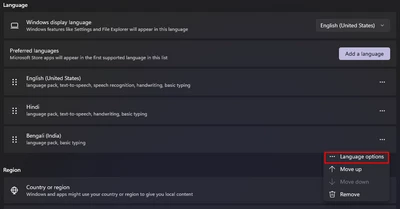
  • Once the language of your choice is installed, click on the 3 dots next to it to go to the Language Options


  • Then click on Add a keyboard to add the Bangla Phonetic keyboard


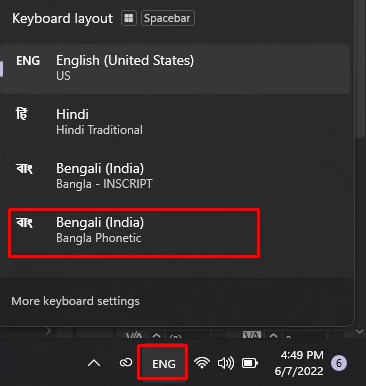
  • Now you can select the Bangla INSCRIPT or the Bangla Phonetic keyboard from the language bar at the bottom right corner of your screen. You can also toggle using the Windows + Space keys.


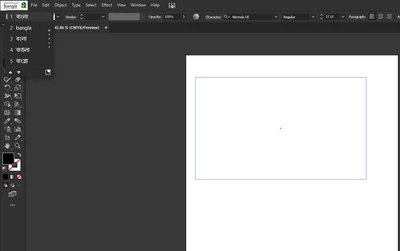
  • I use the Phonetic keyboard because it would let me type in regular English and select the appropriate Bangla word for it from the toolbar by simply using the up/down arrow key to select the word and hit space.


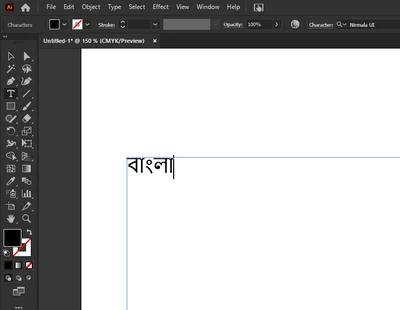
  • You can now type in the language of your choice in not just Illustrator but any app on your computer.


Kindly update this thread if you need further assistance. We'd be happy to help.


Thanks,

Anubhav


Note: Marking correct for visibility.

1 reply

Anubhav MCommunity ManagerCorrect answer
Community Manager
March 6, 2023

Hello @md.dini52336411,


Sorry to hear about this experience. If you are using a Windows computer, I would suggest you follow these steps to type in Bangla/Bengali in Illustrator:
  • Open the Time and Language settings under Windows Settings and select Language & region:


  • Then click on the button to add a language. Use either Bengali (India) or Bangla (Bangladesh). I used the former.


  • Once the language of your choice is installed, click on the 3 dots next to it to go to the Language Options


  • Then click on Add a keyboard to add the Bangla Phonetic keyboard
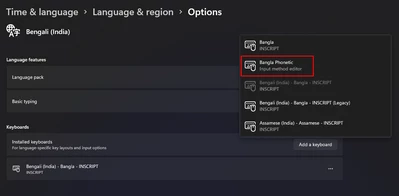
     

  • Now you can select the Bangla INSCRIPT or the Bangla Phonetic keyboard from the language bar at the bottom right corner of your screen. You can also toggle using the Windows + Space keys.


  • I use the Phonetic keyboard because it would let me type in regular English and select the appropriate Bangla word for it from the toolbar by simply using the up/down arrow key to select the word and hit space.


  • You can now type in the language of your choice in not just Illustrator but any app on your computer.


Kindly update this thread if you need further assistance. We'd be happy to help.


Thanks,

Anubhav


Note: Marking correct for visibility.

New Participant
August 14, 2023

It works !!! Thanks a ton, Anubhav Majumdar ❤️

New Participant
March 20, 2025

কাজ করে না