
Known Participant
January 19, 2022
Question

Batch export PDF/PNG with custom file names (csv variable library)

  • January 19, 2022
  • 1 reply
  • 10643 views

Hi there,
I'm still fairly new to Illustrator, so hope someone can help me out.


What I want to achieve:

I want to automate some tasks and thus, be able to import a .csv spreadsheet as a variable library that creates x no. of datasets with different headlines, images and a source/text.

I want to be able to batch export these as both pdf and png (png = zoom 300%, clipped to arboard) as individual files (2 for each dataset) with a custom name for each dataset based on some variable. See the example below where I have imported the variable library. If I can export as pdf and png with name = HeadlineVariable (object name) for each dataset - that would be ideal:
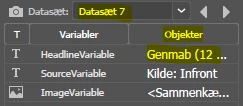
All exports can go to the same folder. It is fine if this is the same folder each time, say called "export" in some specific path. However, ideally I would want 2 subfolders in "export" called "pdf" and "png" - but not necessary.


Where I am currently:

I can import my csv sheet and see my different datasets which are all showing correctly as I cycle through them.

However, I do not know how to batch export these with a custom name for each. Seems like it will only let me name them as the dataset name, or filename + number, etc.

Normally I would achieve something like this using recorded actions, however, I don't know how to do this using datasets with a custom name for each as explained above:

Not sure if I need a script. If so, I have never used scripts before and would like some help setting this up.


Thanks,
Rasmus

This topic has been closed for replies.

1 reply

Met1
Legend
January 19, 2022

Use actions, take a look at this: https://www.youtube.com/watch?v=sW70hB_WeWM

Known Participant
January 19, 2022

I just had a quick look.
She is just doing a batch export (using actions as I'm also able to do) and naming the png files as 'filename + data set'.

What I want to accomplish is to give each exported data set a custom name.


In the video she has got 4 variables (imported). 2 text variables and 2 image variables. If I can give each file (pdf & png) a name that matches one of my text variables - that would be perfect. However, options are very limited:

Variable 1 ('HeadlineVariable' in my case) is unique for each imported dataset. This is my desired filename for each of the exported pdf's and png's.

If i can somehow change Data Set names so it always matches one of my variables (unique) for each file - that would work.


Known Participant
January 20, 2022

That indeed looks like what I need. However, I have now tried it.. and it does not work for me for some reason.


I download the script and open it. I choose my file path (.csv sheet). I assign data set names to one of my variables.
It even gives me the option to test data set names and images before I import data - and it looks correct! Problem is, when I then click import none of the variables change in my file. Data set names are correct, however, image, headline and my other text variable do not change whatsoever.
Ps. Also, when importing it gives me this message, which I don't know why:

In this example I try to import 7 datasets, each with 3 variables. But the 'Cycle' button does not do anything.


Not sure if I'm missing a step or something else in the script settings? I've looked through all options and tested some.

Normally, when importing variable libraries, I just import it and it replaces 3 variables in the file by matching it with the header in my .csv. I do not need to do anything else..