
Known Participant
September 13, 2017
Answered

Better tracing results?

  • September 13, 2017
  • 1 reply
  • 815 views

Hello,

I'm having a hard time tracing/converting a certain raster file into vector in Illustrator:

Original:
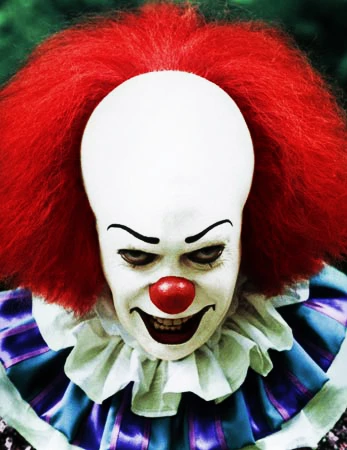
Traced:

I've tried messing around with tracing options but can't really get the result I want...details of the teeth, eyes, etc.

Any tips for tracing this specific image, or images in general?

Should I tweak anything on the raster beforehand like contrast, saturation, etc.?

Any suggestions on custom tracing settings?

Many thanks.

This topic has been closed for replies.
Correct answer Bill Silbert

in that case look at the image trace window found under the Windows menu. There are a number of presets there in the pull-down menu that you can set prior to running the trace. Remember, once you've done the trace then hit the Expand button next to the Image trace in the Control Panel and it will become editable art.

1 reply

Bill Silbert
Community Expert
Community Expert
September 13, 2017

Before anybody on the forum can help you on this it must be pointed out that using a commercial photo like this as even a basis for a design that you are doing violates copyright laws. If your intent is just practice then please let us know and somebody will help.

mrbcox47Author
Known Participant
September 13, 2017

It's 100% practice. I'm testing out different images and notice that some don't trace as well as others, just trying to see why

Bill Silbert
Community Expert
Community Expert
September 13, 2017

Thank you very much, Bill!


Happy to help.