
Participant
June 7, 2023
Answered

Biegung Schriftzug

  • June 7, 2023
  • 2 replies
  • 493 views

Hallo Zusammen,

zur Info gleich vorweg - ich bin kompletter Anfänger und hab eine Frage und hoffe, dass mir jemand von Euch helfen kann.

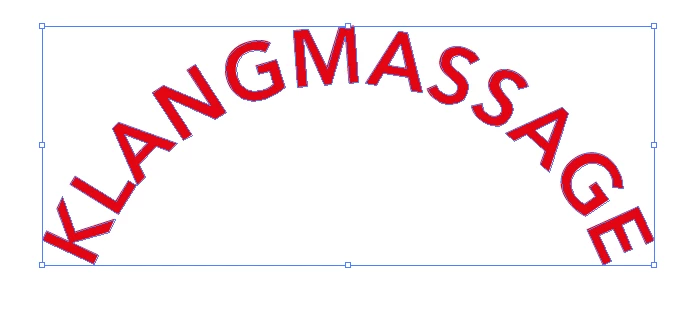
Ich habe diesen Schriftzug den ich wieder "gerade stellen" möchte. Ich denke bzw. hoffe, dass es hierfür eine einfache Möglichkeit gibt und mir dabei jemand helfen kann. Danke schon mal im Voraus 🙂 

GLG Christina 
This topic has been closed for replies.
Correct answer Anubhav M

Hello @Christina26840926z4bj,


Thanks for reaching out. As suggested by sishamIAGD, rasterized images / outlined text cannot be adjusted, and the best solution would be to start afresh with a new document.
Also, kindly try the tutorials shared here (https://helpx.adobe.com/illustrator/tutorials.html) to help with your creative journey in Illustrator and share your observations.


Looking forward to hearing from you.


Thanks,

Anubhav

2 replies

Anubhav M
Community Manager
Anubhav MCommunity ManagerCorrect answer
Community Manager
June 7, 2023

Hello @Christina26840926z4bj,


Thanks for reaching out. As suggested by sishamIAGD, rasterized images / outlined text cannot be adjusted, and the best solution would be to start afresh with a new document.
Also, kindly try the tutorials shared here (https://helpx.adobe.com/illustrator/tutorials.html) to help with your creative journey in Illustrator and share your observations.


Looking forward to hearing from you.


Thanks,

Anubhav

Participant
June 9, 2023

OK thank you 🙂

sishamIAGD
Community Expert
Community Expert
June 7, 2023

Unfortunately not, it would be a lot easier just to recreate

Participant
June 9, 2023

OK thank you 🙂