Participant
September 5, 2023
Answered

Blend Tool Smooth Color Blend

  • September 5, 2023
  • 2 replies
  • 686 views

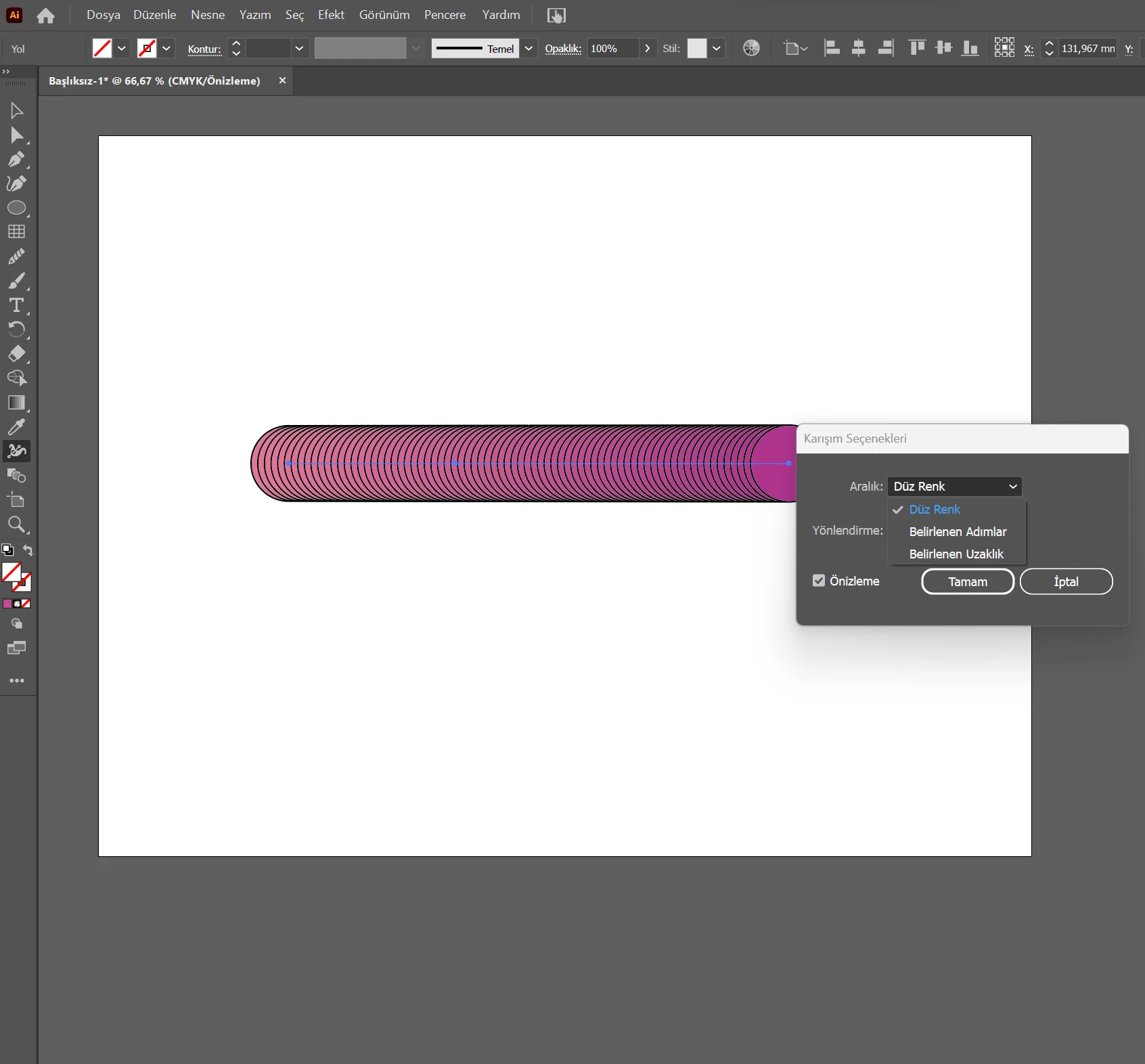
Karışım aracında düzgün bir renk karışımı yoktur. Bunun yerine düz renk seçeneği var.

This topic has been closed for replies.
Correct answer Monika Gause

First of all I would delete the stroke.

Then you should already get a smoother result.

But you could just select number of steps and then input whatever number of steps is appropriate.


https://youtu.be/mVu9BzYaBbs 

2 replies

Monika Gause
Community Expert
Community Expert
September 5, 2023

Maybe it's just translated in the wrong way.


So your problem is that the blend is not smooth?

Participant
September 5, 2023

Yes.I want it to be like the first photo but it's like the second picture.

Monika Gause
Community Expert
Monika GauseCommunity ExpertCorrect answer
Community Expert
September 5, 2023

First of all I would delete the stroke.

Then you should already get a smoother result.

But you could just select number of steps and then input whatever number of steps is appropriate.


https://youtu.be/mVu9BzYaBbs 

Participant
September 5, 2023

There is no smooth color blend in the blend tool. There is a solid color option instead