
Inspiring
December 13, 2023
Answered

Blending along a cruve problem with spacing and orientation

  • December 13, 2023
  • 5 replies
  • 738 views

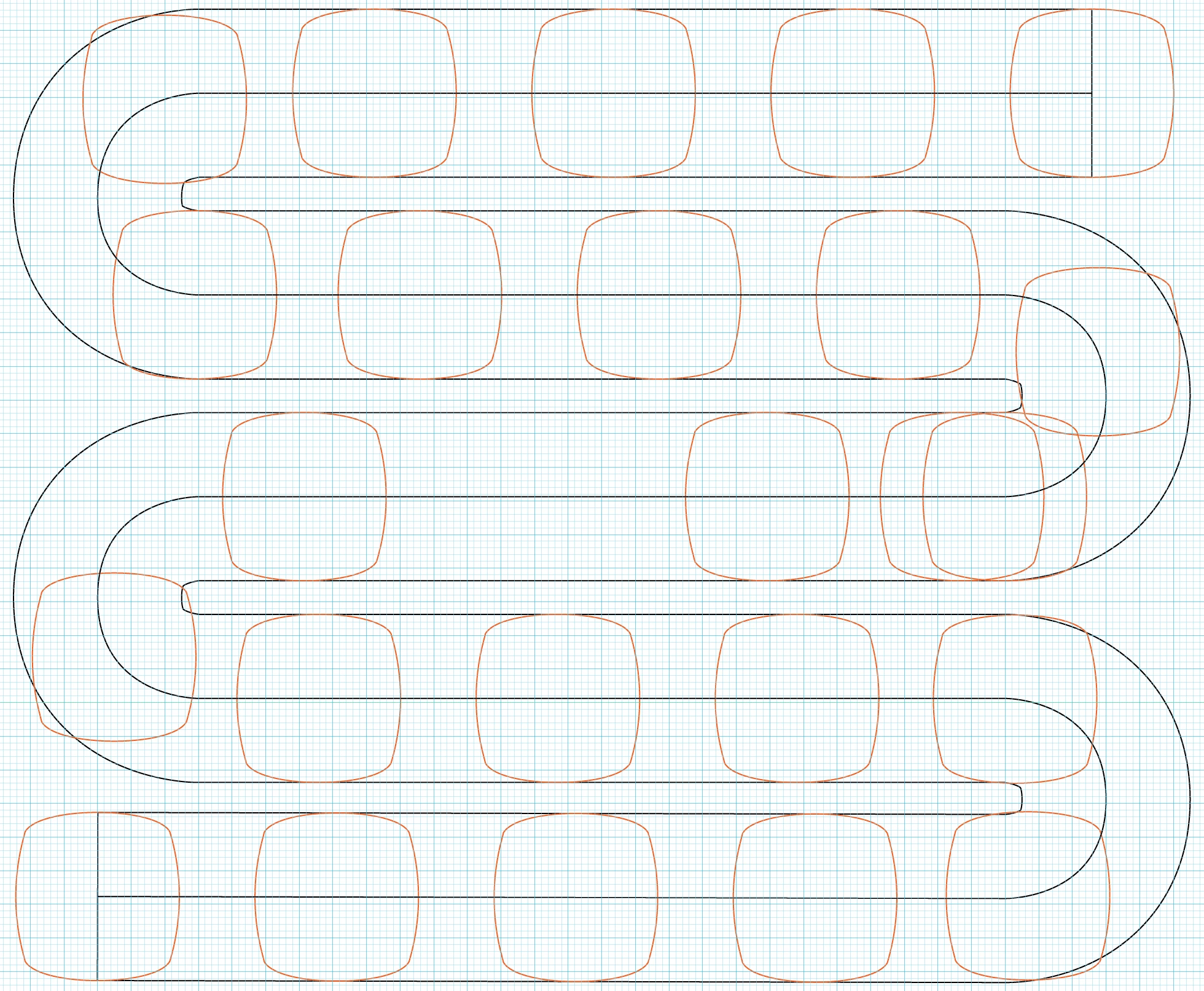
I trying to blend along a path and cannot seem to understand why the spacing is getting messed up somewhere around the middle of the path. Some shapes are overlapping because they're out of place. Not sure what's going on. In the attachment, I am blending along the center line, the two shapes at either end of the snake curve.
This topic has been closed for replies.
Correct answer Jacob Bugge

nmycps,


Apart from the orientation, which seems to be set to Align to Page rather then Path, there can be issues with rougue points and whatnot, but one fundamental property of Blends is that lengths of segments (and Handles) matter.


So maybe one thing to try first could be to see if you can just add a sufficient number of Anchor Points, which can be done with the Object>Path>Add Anchor Points. Ctrl/Cmd+Z is your friend if it fails to help.


5 replies

nmycpsAuthor
Inspiring
December 14, 2023

Once I found a wildly out of place handle, I moved it back over to the node on the left and that solved my problem.

Thank you all for the suggestions.

Jacob Bugge
Community Expert
Community Expert
December 14, 2023

For my part you are welcome, nmycps, and thank you very much for sharing.


Jacob Bugge
Community Expert
Jacob BuggeCommunity ExpertCorrect answer
Community Expert
December 14, 2023

nmycps,


Apart from the orientation, which seems to be set to Align to Page rather then Path, there can be issues with rougue points and whatnot, but one fundamental property of Blends is that lengths of segments (and Handles) matter.


So maybe one thing to try first could be to see if you can just add a sufficient number of Anchor Points, which can be done with the Object>Path>Add Anchor Points. Ctrl/Cmd+Z is your friend if it fails to help.


Monika Gause
Community Expert
Community Expert
December 14, 2023

Before doiong that, we would need to know if there is a duplicate anchor point in that corner, which is pretty likely.

Ares Hovhannesyan
Community Expert
Community Expert
December 13, 2023

I get different results when changing value in Bland panel. I think it depend how script calculate distance between object and depends on form of the object

Monika Gause
Community Expert
Community Expert
December 13, 2023

Can you check if there are 2 points in the blend spine?

Doug A Roberts
Community Expert
Community Expert
December 13, 2023

How did you make the replacement spine path? Can you see if there are overlapping points anywhere along it?