Exit
  • Global community
    • Language:
      • Deutsch
      • English
      • Español
      • Français
      • Português
  • 日本語コミュニティ
  • 한국 커뮤니티
0

Blending tool for connected one line logo (like infinity logo but two point overlapped)
New Here ,
Feb 19, 2025 Feb 19, 2025

 Screenshot 2025-02-19 at 17.54.36.png

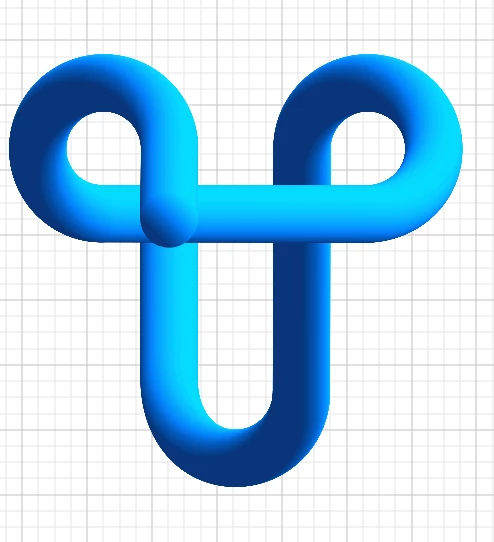
Hi I'm working on a logo like this.  

It is one line logo, but overlapping part is a bit tricky. There are two vertical lines, what I want to do is the right one is behind, the left one if front of horizontal line. I found tutorials for one line object that have two both end. But my design is no end. How to connect it naturally?
I tried two pathes separate. but both end point would be visible.
It should not be that gradient 3d texture. Could be plain gradient colour like this

Screenshot 2025-02-19 at 18.10.12.pngThank you in advance!

TOPICS
Draw and design , How-to
766
Translate
Report
Community guidelines
Be kind and respectful, give credit to the original source of content, and search for duplicates before posting. Learn more
community guidelines

correct answers 3 Correct answers

Community Expert , Feb 19, 2025 Feb 19, 2025

Here's a way to execute it as a vector. You'll need three separate pieces (segments shown in image). This is a quick version, but if you can get the gradients to line up, this could work for you as a vector graphic.

Screenshot 2025-02-19 at 2.53.59 PM.png

Translate
Community Expert , Feb 19, 2025 Feb 19, 2025

As far as I understand your request, it should also be possible with one continuous path to which an Art brush is applied (possibly combined with additional appearance attributes).

Translate
Advocate , Feb 20, 2025 Feb 20, 2025

Ayako, hi.

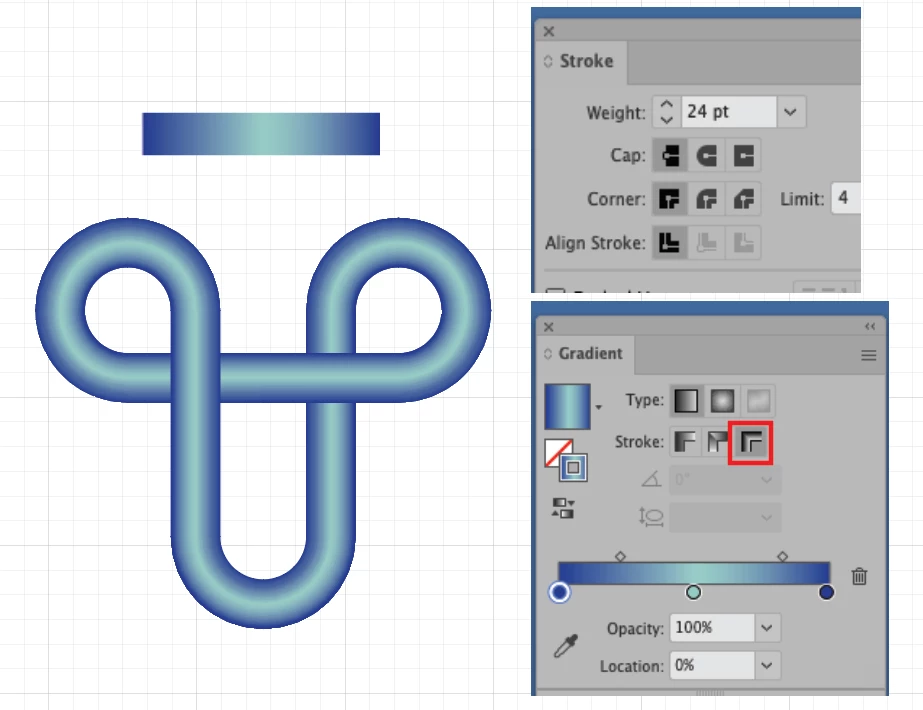
Would you be interested in something like this??

Here I am working with strokes and a gradient. It gives you somewhat a 3D look.

It’s 3 paths, cut like Tina’s example.

Apply gradient across stoke.


K

Screen gradient.png

Translate
Adobe
Community Expert ,
Feb 19, 2025 Feb 19, 2025

You cannot connect it.

You can only fake it.

Easiest would be to do it in Photoshop. Then you will have a rasterized logo. Which doesn't matter, because the blend version isn't suitable as a logo either.

Translate
Report
Community guidelines
Be kind and respectful, give credit to the original source of content, and search for duplicates before posting. Learn more
community guidelines
New Here ,
Feb 19, 2025 Feb 19, 2025

Thank you for your advice. I exported .psg format. In Photoshop which tool shoul I use ? I could not use healing brush here. Shoud I marge the layers? 
In the end I need SVG and CSV. If there any other way with illustrator too, I would like to know! thank you

Screenshot 2025-02-19 at 19.10.27.png

Translate
Report
Community guidelines
Be kind and respectful, give credit to the original source of content, and search for duplicates before posting. Learn more
community guidelines
Community Expert ,
Feb 19, 2025 Feb 19, 2025

You could check out the clone tool.


It will be a mixture of several tools to iron that out and it's certainly not a one-click solution.

Translate
Report
Community guidelines
Be kind and respectful, give credit to the original source of content, and search for duplicates before posting. Learn more
community guidelines
Community Expert ,
Feb 19, 2025 Feb 19, 2025

Here's a way to execute it as a vector. You'll need three separate pieces (segments shown in image). This is a quick version, but if you can get the gradients to line up, this could work for you as a vector graphic.

Screenshot 2025-02-19 at 2.53.59 PM.png

Translate
Report
Community guidelines
Be kind and respectful, give credit to the original source of content, and search for duplicates before posting. Learn more
community guidelines
New Here ,
Feb 19, 2025 Feb 19, 2025

Hi Tina, thank you! It looks like exactly what I want.
I made a wrong separation before.
I appreciate it!

Translate
Report
Community guidelines
Be kind and respectful, give credit to the original source of content, and search for duplicates before posting. Learn more
community guidelines
New Here ,
Feb 20, 2025 Feb 20, 2025

Hi again, with Tina's way, I'm getting there but still need to explore the gradient to show the overlapped points.

I still wanna do the first proposal - 3d look one.

Can I make a object from blended line? Then I want substact the rounded bar to rectangle. 
It is many circle pathes so far. I expanded it but it became just a group.
Thank you in advance!
AI2.jpg

Translate
Report
Community guidelines
Be kind and respectful, give credit to the original source of content, and search for duplicates before posting. Learn more
community guidelines
Community Expert ,
Feb 19, 2025 Feb 19, 2025

As far as I understand your request, it should also be possible with one continuous path to which an Art brush is applied (possibly combined with additional appearance attributes).

Translate
Report
Community guidelines
Be kind and respectful, give credit to the original source of content, and search for duplicates before posting. Learn more
community guidelines
New Here ,
Feb 20, 2025 Feb 20, 2025

Hi Kurt, Thank you for your response! I tried it. It worked shape wise.
I made a gradient blush, but it does not work well for curve path.
Could you give me any advice for the problem?Screenshot 2025-02-20 at 12.01.32.png

Translate
Report
Community guidelines
Be kind and respectful, give credit to the original source of content, and search for duplicates before posting. Learn more
community guidelines
Advocate ,
Feb 20, 2025 Feb 20, 2025

Ayako, hi.

Would you be interested in something like this??

Here I am working with strokes and a gradient. It gives you somewhat a 3D look.

It’s 3 paths, cut like Tina’s example.

Apply gradient across stoke.


K

Screen gradient.png

Translate
Report
Community guidelines
Be kind and respectful, give credit to the original source of content, and search for duplicates before posting. Learn more
community guidelines
New Here ,
Feb 20, 2025 Feb 20, 2025
LATEST

Hi, thank you for another proposal. It works well too!

Translate
Report
Community guidelines
Be kind and respectful, give credit to the original source of content, and search for duplicates before posting. Learn more
community guidelines