
Participant
February 8, 2017
Answered

Blue comes up as Purple

  • February 8, 2017
  • 2 replies
  • 7973 views

Was working in Illustrator and had created an image with a fill in Blue. Had to reinstall Illustrator and now Blue fill comes up as Purple on the image even though it's still Blue on the swatch.Document color mode is set to RGB color. Not sure what I'm doing wrong
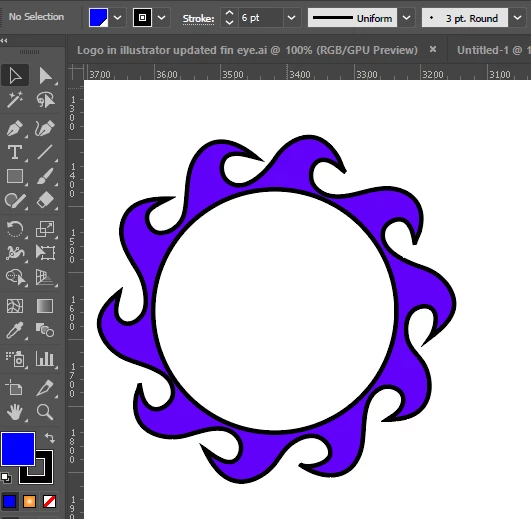
   

    This topic has been closed for replies.
    Correct answer Monika Gause

    CHeck your color management setup and the monitor calibration. Also the soft proof setup.

    2 replies

    Participant
    February 9, 2017

    Thanks so much for your help Monika. I disabled the GPU performance and all back to blue again

    Participant
    May 17, 2021

    THIS SAVED ME! Thank you, there.

    Participant
    May 17, 2021

    For anyone who is wondering how the GPU Preview works:

    https://helpx.adobe.com/ca/illustrator/kb/gpu-performance-preview-improvements.html


    Tl;dr

    Cmnd/Ctrl + E will disable/enable the discolouration. Alternatively, Go to View > GPU Preview/CPU Preview to toggle back to the desired Preview.

    Monika Gause
    Community Expert
    Monika GauseCommunity ExpertCorrect answer
    Community Expert
    February 9, 2017

    CHeck your color management setup and the monitor calibration. Also the soft proof setup.