
Participant
January 7, 2019
Answered

broken links after placed images in illustrator

  • January 7, 2019
  • 1 reply
  • 2893 views

Hi there, I have a problem with placed images in Illustrator. I have Adobe CC 2019. I work for years already with placing images (illustrator files) in Illustrator, so that the original file is somewhere on the computer and creates a link > you see a square in the images then. And when you adjust the original file, the image in the illustrator document changes along. But...for some reason I don't get the square in images anymore, images don't seem to be linked after placing it?? Help! This is not good for my work and efficiency. Thanks for the solution!
This topic has been closed for replies.
Correct answer Bill Silbert

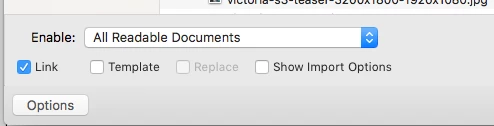
Make sure that when placing an image that the "Link" option is checked in the dialog window that appears when using the Place command. When the dialog window first appears the option may be grayed out but as soon as soon as you click on the image you want to import it will become available. See screen shot:

1 reply

Bill Silbert
Community Expert
Bill SilbertCommunity ExpertCorrect answer
Community Expert
January 7, 2019

Make sure that when placing an image that the "Link" option is checked in the dialog window that appears when using the Place command. When the dialog window first appears the option may be grayed out but as soon as soon as you click on the image you want to import it will become available. See screen shot:

lhaas82Author
Participant
January 7, 2019

Thank you Bill! I have no idea how this box got unchecked... I always double click to insert the image, so never noticed that there was a box to check. Thanks!

Bill Silbert
Community Expert
Community Expert
January 7, 2019

Happy to help.