
Known Participant
September 16, 2017
Answered

Brush modifying changes previous strokes.

  • September 16, 2017
  • 2 replies
  • 2724 views

Hi When I modify my brush settings, such as stroke width, all my previous brush strokes on my artwork are changed.
Can anyone explain this? Just simply want to change my brush settings from that point on.Cant find anything in user guide.
    This topic has been closed for replies.
    Correct answer Monika Gause

    The brushes in the brushes panel are linked to all the paths they've been applied to. Edit a brush - all the paths get an update.

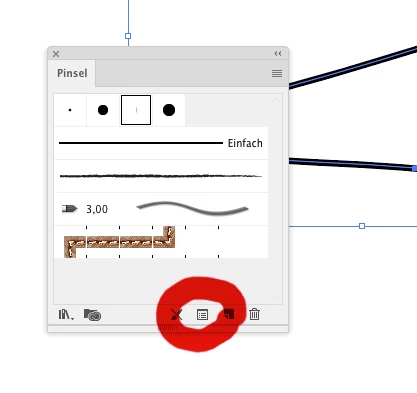
    When you want to edit just one path, select it and click on the button in the bottom of the brushes panel, "settings for selected object" (or the like - I have a German version)

    2 replies

    Flemgooz1Author
    Known Participant
    September 16, 2017

    Hi Monica,
    I don't get it.
    Why would anyone want to edit all the previous line thicknesses by default?
    One would only choose to do that if all the previous paths are selected.
    I haven't even selected them.
    I done even want to edit the existing path.
    I want a new brush before I draw the stroke, just like when illustrating, so I can see what I am drawing.

    I realize vector illustrating is not the same as bitmap programs or traditional, but isn't that cumbersome in the extreme?
    I mean, I change brush widths thousands of times.
    Why would anyone want to change the whole drawing unless they select it to change

    I have also noticed that the brush width on the Properties bar ( or is it 'Control Panel' in Adobe) keeps changing back to 1 point when I say set it at 7 point when I apply the brush to the page.
    I usually have to do several demos in the corner of the page before the (say) 7 point

    You don't have to answer this last paragraph because it appears a 'given', as arduous as it is.

    Thankyou for your help, you are very gracious, and I don't believe I used that button, or it was not active. Maybe have to limit my line drawing to Corel, and then import it into AI, seeing it is supposed to be the "industry requirement" now.

    Larry G. Schneider
    Community Expert
    Community Expert
    September 17, 2017

    One thing to check is in the Appearance panel flyout, do you have New Art Has Basic Appearance checked?

    Monika Gause
    Community Expert
    Monika GauseCommunity ExpertCorrect answer
    Community Expert
    September 16, 2017

    The brushes in the brushes panel are linked to all the paths they've been applied to. Edit a brush - all the paths get an update.

    When you want to edit just one path, select it and click on the button in the bottom of the brushes panel, "settings for selected object" (or the like - I have a German version)