

Samer Alhassan
Participating Frequently
September 19, 2021
Answered

Cambria Math in illustrator not showing Characters

  • September 19, 2021
  • 4 replies
  • 3542 views

i'm copying equations from powerpoint to illustrator

when i use Cambria math as a font the text comes out like this is the document:
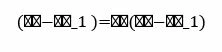
when in the font preview it shows correctly like this:



How can i make the text in the document look like the text in the Font preview??


This topic has been closed for replies.
Correct answer foid64523394

Hi,

I had the same issue on mac to open PDF files created in Windows and using the Cambria Math font.

My solution was to use the Ghostscript PDF to PostScript translator "pdf2ps" to make a copy of the file. 

This new file opened like a charm in Illustrator.

4 replies

foid64523394
foid64523394Correct answer
Participant
July 28, 2023

Hi,

I had the same issue on mac to open PDF files created in Windows and using the Cambria Math font.

My solution was to use the Ghostscript PDF to PostScript translator "pdf2ps" to make a copy of the file. 

This new file opened like a charm in Illustrator.

Mike_Gondek10189183
Community Expert
Community Expert
September 21, 2021

I also am on mac and have no issue. 


Try seting that directly in Illustrator, if it works you then know the issue is the clipboard transfer from powerpoint to Illustrator and nothing to do with the font. You can then search you powerpoint preferences for anything related to clipboard or foreign language settings, as it seems to be converting the alpha characters to universal ascii.

Samer Alhassan
Participating Frequently
September 21, 2021

i pasted on MS Word and there were no issues, also yes when i type on illustrator there is no issue.

i'm not experienced with Powerpoint so can you guide me on how to change the Transfer Preferences?

Mike_Gondek10189183
Community Expert
Community Expert
September 22, 2021

Sounds like what microsoft sends to clipboard works with Microsoft products only. Are you using any special characters to get those symbols


Try pasting into a basic text editor (eg: simpletext, textedit), then copy again and then paste into illustrator. That might strip out whatever Microsoft is putting onto it.


I am on mac so dont belive my preferences will help, as no issue on the mac.


I also am seeing cambria math font on  mac powerpoint, but no on illustrator, so might be a custom install font on in Microsoft apps. Do you ned to sue Cambria, would use a different font as you may not have the same font installed on Ilustraror, or at least you have not provided us with information to help you determine that.

Larry G. Schneider
Community Expert
Community Expert
September 20, 2021

Is the Cambria font a True Type font or an Open Type font? Try using an Open Type font.

Samer Alhassan
Participating Frequently
September 21, 2021

can you tell me how to do that?


Anshul_Saini
Community Manager
Community Manager
September 20, 2021

Hi there,


Sorry about the trouble. I am unable to replicate this issue at my end. 


I would request you to share a few more details like:

  • OS and version of Illustrtaor
  • Does resetting Illustrator Preferences ( https://helpx.adobe.com/illustrator/using/setting-preferences.html) help to resolve the issue?
    Disclaimer: Please note that resetting preferences will remove all the custom settings, and Illustrator will launch with default settings. You can also take a backup of the folders in case you want to. Location is mentioned in the article.
  • Did you type this equation in PowerPoint or copy-pasted it from somewhere?


We are here to help. We just need more information.


Thanks & Regards,

Anshul Saini

Samer Alhassan
Participating Frequently
September 21, 2021

Hello

Thank you for your reply

  • i'm using windows 10 and illustrator 2020
  • resetting preferences did not solve the issue
  • the equations were written in powerpoint