
Franky Spills
Known Participant
February 15, 2022
Answered

Can I moved a Mapped Art on a 3D Object?

  • February 15, 2022
  • 1 reply
  • 422 views

Hello.


New to mapping 3D art in illustrator.  I see there is a new 3D bevel and revolve tool.  I'm using the classic method but I'm happy to use the new filter as well.  But I haven't found a way to map any symbols to the 3D object with the new filter?  Other than that it works well.


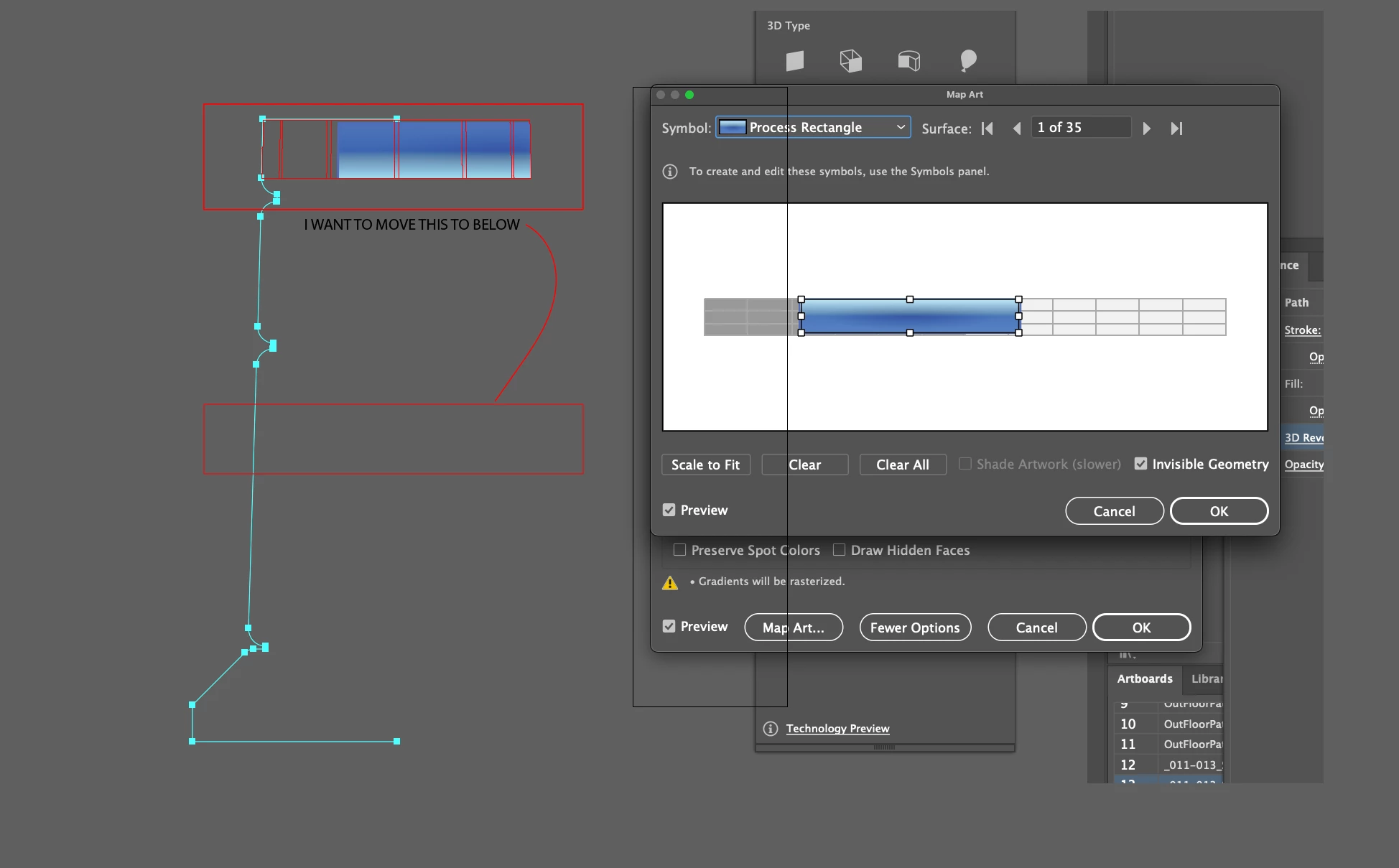
For the classic method.  I have crated a 3D object... like a cylinder... now I want to map a label on it.  I've created the label and made it a symbol.  When I try to apply it, AI maps the symbol to the top of the cylinder.  I want to move it to the middle but I cannot figure out how to relocate it.  I can scale it... but I cannot move it.


I would call this the classic method of doing this.


IS there a way to do it with the new 3D bevel and filter?  I cannot find a "map art" button anywhere in the new filter.


Thanks!  Hope that makes sense.


This topic has been closed for replies.
Correct answer Laura Coyle.

The new feature does not have that capability yet. For now, use the classic feature for mapping.


From your screenshot, it looks like you need to use the arrows in the upper right of the panel to change which surface you are mapping to. Right now you are on 1 of 35, so you may need to press the arrow a few times to get to the surface you want to map on to.

1 reply

Laura Coyle.
Community Expert
Laura Coyle.Community ExpertCorrect answer
Community Expert
February 15, 2022

The new feature does not have that capability yet. For now, use the classic feature for mapping.


From your screenshot, it looks like you need to use the arrows in the upper right of the panel to change which surface you are mapping to. Right now you are on 1 of 35, so you may need to press the arrow a few times to get to the surface you want to map on to.

Franky Spills
Known Participant
February 15, 2022

Ah!  Yes that worked.  I didn't even see that button.  Thanks for pointing it out!  Worked great.