
Participant
November 19, 2015
Question

Can I use .xls data to recolor .ai shapes?

  • November 19, 2015
  • 3 replies
  • 815 views

Hello smart people!

I'm looking for an automated way to use basic Excel data to recolor shape fills in AI.  Basically, take a simple data set like this:

ShapeValue
11.3
24.6
37.8
43.1
59.0

And have it drive the color of specifically named shapes similar to this:
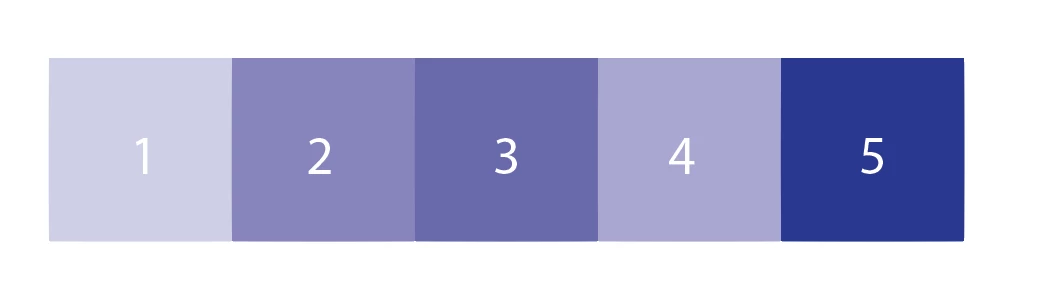
The data would correspond to a custom color palette, or just adjust the K value of a specified CMYK color.
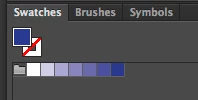
Has anyone done something similar?  I've looked into Variables and it doesn't look promising.  I'm sure it'll take some level of scripting, I just don't have those skillz.  Any help would be appreciated, I've got a million data sets to visualize!

This topic has been closed for replies.

3 replies

Disposition_Dev
Legend
November 19, 2015

Ok. Here's the first version that's reading a CSV file located on the desktop called "excelTest.csv" (formatted like the example you posted). I don't know whether you're a Mac or PC user. the relative path to desktop i used is for Mac. If you're on a PC, just comment out line 35 (2 forward slashes at the beginning) and uncomment line 36 (remove the 2 slashes).

let's just make sure this is on the right track before i go too much further into the specifics.

If you're able to share it, an example of the file you're going to be using the script on would be immensely helpful. let me know how it works for you. =)

function wrapper(){

    var docRef = app.activeDocument;

    var swatches = docRef.swatches;

    var theInfo = getCSV();

    var titles = theInfo[0];

    titles = titles.split(',');

    var shapeTitle = titles[0];

    var valueTitle = titles[1];

    theInfo.splice(0,1);

    var theSwatch = makeSwatch();

    theSwatch.name = "The Swatch";

    function makeSwatch(){

        var newSpot = docRef.spots.add();

        var newSwatch = new CMYKColor();

        newSwatch.cyan = 30;

        newSwatch.magenta = 30;

        newSwatch.yellow = 30;

        newSwatch.black = 100;

        newSpot.name = "The Color";

        newSpot.colorType = ColorModel.SPOT;

        newSpot.color = newSwatch;

        var newSpotColor = new SpotColor();

        newSpotColor.spot = newSpot;

        return newSpotColor;

    }

    function getCSV(){

        var thePath = "~/Desktop"; //Mac relative path to desktop

        // var thePath = "../Desktop"; //PC relative path to desktop. comment line above and uncomment this line if uing PC

        var theFile = new File(thePath + "/excelTest.csv");

        theFile.open();

        var contents = theFile.read();

        theFile.close();

        contents = contents.split('\n');

        return contents;

    }

    var left = 0;

    for(var a=0;a<theInfo.length;a++){

        var thisShape = theInfo;

        thisShape = thisShape.split(',');

        var shape = thisShape[0];

        var value = thisShape[1];

        var makeShape = docRef.pathItems.rectangle(0,left,100,100);

        left+=100;

        makeShape.fillColor=swatches['The Color'].color;

        makeShape.stroked = false;

        makeShape.name = 'Shape ' + thisShape[0]

        makeShape.fillColor.tint = thisShape[1] * 10;

    }

}

wrapper();

cnyaraAuthor
Participant
November 19, 2015

thanks william... i think i'm having issues with this Jive system and not sure if my message got through.  If you message me your email address i can shoot over some representative files.

Thanks!

Disposition_Dev
Legend
November 19, 2015

like Silly says, everything depends on your long term needs. but for the sake of practicing and giving you some insight on the simpler end of things, let's have a crack at doing just what you asked for above.

Give me a few minutes and i'll see what I can't rustle up for ya.

cnyaraAuthor
Participant
November 19, 2015

thanks, william... curious to see what you come up with!

Disposition_Dev
Legend
November 19, 2015

are you averse to using spot colors? do you already have a swatch library created or were you going to make one? the easiest way to do this will be to use 1 spot color and adjust the tint to match the 'value'.

Silly-V
Legend
November 19, 2015

While the wonderful people of the forums may be able to provide a simple and amazing custom solution for you, I actually had posted an article on this very topic some time ago:

https://www.linkedin.com/pulse/illustrator-variable-data-advanced-techniques-recoloring-vasily-hall

Admittedly, this would be for someone who has to do this kind of thing regularly on different documents and/or situations, so the setup effort would be worth the time. For a single-time use, though, it would also work, but someone on here may be able to provide a simpler custom solution to fit just the situation at hand.

cnyaraAuthor
Participant
November 19, 2015

I'll look into your post, thanks!  I searched high and low for articles, can't believe I missed yours.