
Inspiring
November 5, 2018
Answered

Can only select edges

  • November 5, 2018
  • 3 replies
  • 7536 views

If I use the open arrow tool to select the interior of an element, it does not select the whole element.  Likewise, using to select the interior of a link, doesn't select.  Instead, I have to select the edge (on an image, painstakingly hide any crops until the edge can be found).  Has only occurred with 23.0 and 23.0.1.  It isn't "Show bounding box".  Ideas?
This topic has been closed for replies.
Correct answer Ray Yorkshire

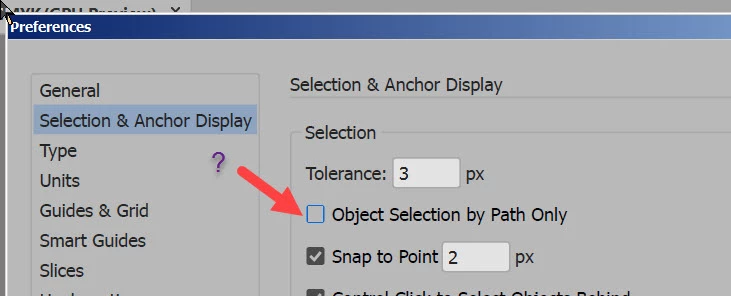
is that ticked

3 replies

barbara_a7746676
Community Expert
Community Expert
November 5, 2018

The issue may be what Ray Yorkshire pointed out.

It could also be that you are viewing Outline instead of Preview.

To select a whole element, use the black Selection tool. The only time that the white Direct Selection tool will select a whole element is if that element is in Preview view and also has a fill color (won't select the whole element if the fill is none.)

By default, Illustrator shows a bounding box when an element is selected with the black Selection tool, not the white Direct Selection tool.

Inspiring
November 5, 2018

I toggle frequently between outlines.

white arrow + OPTION will select the whole element.  For my workflow I rarely use Black Arrow since it will select entire groups/masks.

Inspiring
November 5, 2018

yes it was.  Thanks.

Ray Yorkshire
Ray YorkshireCorrect answer
Participating Frequently
November 5, 2018

is that ticked

laserghost
Participant
February 24, 2024

why is that the default setting, adobe? lol, like what a mind-cuss, for someone who's been using this software their entire life.

laserghost
Participant
February 24, 2024

oh wait, nevermind. My software's just broken. That's not even selected, but that's what it's doing.