kililio
Participating Frequently
April 11, 2012
Answered

can't align a stroke to inside

  • April 11, 2012
  • 9 replies
  • 195173 views

Hi,

I 've created a shape (Rectangle) , Applied a rounded corners, expand appearance, and a linear gradient.

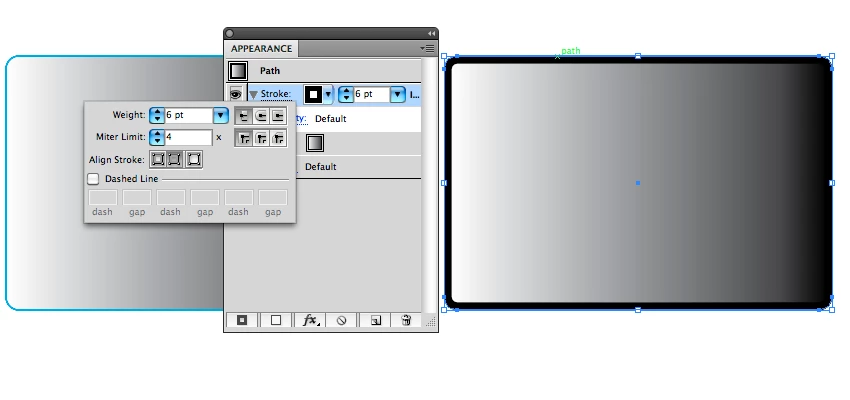
After that i added a stroke in the appearance panel (2pt wide), filled it with white and when I wanted to align this stroke to inside

I can't.  The options "Align Stroke to inside" "Align Stroke to Outside" are greyed out .

What's wrong ?

Thank you
Correct answer Mike_Gondek10189183

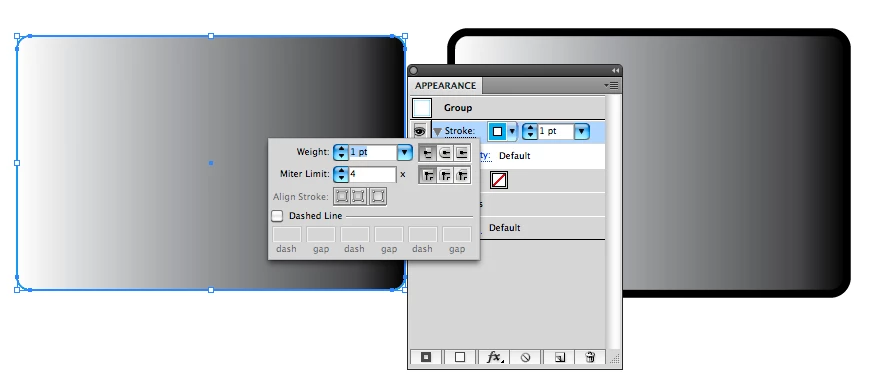
Following your steps, I suspect you added a stroke at the group level. At the group level your option will be greyed out. Yo need to ungroup after your expand appearance.

Try using the appearance panel often, there are many very important features there.

9 replies

Participant
November 2, 2023

Just select the object, go to "object" the click "expand", accept, and you are good to go.

Monika Gause
Community Expert
Community Expert
November 2, 2023

@Vicente Tonat327953116kbb  schrieb:

Just select the object, go to "object" the click "expand", accept, and you are good to go.


Have you read the initial question? And there even is an answer.

CyberGolem
Participating Frequently
December 27, 2020

Thank you but sadly not working. I ungrouped and even checked for open paths but nada. The options still don't appear.

Known Participant
April 22, 2021

This glitch has just caused me to lose 5 hours of work after drawing a complicated floorplan and then finding out the client wants EXACT dimensions based on inside stroke measurement -  and this after cutting up the all the open paths for door openings. No way to re-align the stroke. Darn. 

Monika Gause
Community Expert
Community Expert
April 22, 2021
quote

This glitch has just caused me to lose 5 hours of work after drawing a complicated floorplan and then finding out the client wants EXACT dimensions based on inside stroke measurement -  and this after cutting up the all the open paths for door openings. No way to re-align the stroke. Darn. 


By @rickwtexas


It's not "a glitch". It's how this works. Open paths don't have an inside or outside.


But still you can align the stroke to one side. By using variable width profiles. They can be aligned to just one side of the path and they don't need to be "variable".

Sophie_issa
Participant
March 9, 2018

expand the shape then expand appearance, then try.
Worked for me.

Known Participant
February 11, 2016

The "correct answer" doesn't work for me. I am working with a single, ungrouped object. Expanding appearance does nothing; aligning stroke to either inside or outside is greyed out. Period.

Monika Gause
Community Expert
Community Expert
February 11, 2016

Cindy1643 schrieb:

The "correct answer" doesn't work for me. I am working with a single, ungrouped object. Expanding appearance does nothing; aligning stroke to either inside or outside is greyed out. Period.

Then please create your own thread, because your problem is different.

Post a screenshot.

Participant
November 27, 2014

If you have imported the vector from another document or SVG or PDF file, Control+J / Command+J will join the loose ends and help you out on most cases

Participant
March 17, 2015

This worked for me. Thanks fernandolins!

Mike_Gondek10189183
Community Expert
Mike_Gondek10189183Community ExpertCorrect answer
Community Expert
April 11, 2012

Following your steps, I suspect you added a stroke at the group level. At the group level your option will be greyed out. Yo need to ungroup after your expand appearance.

Try using the appearance panel often, there are many very important features there.

kililio
kililioAuthor
Participating Frequently
April 12, 2012

Thanks a bunch guys !!!

@Mike Gondek , I use the Appearance Panel all dayyyy every day it's my bread and butter , i really like the color panel too , just on top of it ( I got "like photoshop" workspace set up )

thank you a bizillion very much !

Inspiring
April 11, 2012

Hi Kililio

If your shape is using brushes you cannot select align inside or outside (just to center). Also if you have a custom width profile you cannot select that align options too. But using width profiles (or the Width Tool) you could achieve the result you want..as Monika mentioned.

Best Regards

Gustavo.

Participant
January 10, 2017

Another user friendly feature from Adobe...

Monika Gause
Community Expert
Community Expert
April 11, 2012

You can easily achieve it with a custom width profile in version CS5

Kurt Gold
Community Expert
Community Expert
April 11, 2012

It may be an open path although it looks like a closed path. Aligning strokes inside or outside does only work on closed paths.

sinrise
Known Participant
December 29, 2015

This is one of the dumber things that still somehow exist in Illustrator. Why? What if you only want a stroke on one segment of a path? I'd use that ALL the time. If I could put the stroke on one side or another of the actual path, closed or not, it would allow the same result. I love Illustrator but there is bafflingly stupid stuff that Adobe just seems to ignore. You can save the "you're using it wrong" comments. I get it.

Participant
April 22, 2016

I sympathize with SINRISE...Adobe tools should be more consistent in use across all products - INDD, AI, PSD, etc. The things you can do in one program, you can't do in another. [Grrrr...]