
Participant
July 7, 2020
Answered

Can't change workspace

  • July 7, 2020
  • 2 replies
  • 10740 views

I'm in the process of learning how to use Illustrator and have run into a snag. It was working fine until I loaded it up today. My menus have dissapeared and I can't change my workspace. I click on window --> workspace --> essentials but it stays stuck on 'layout." I have tried changing it from the drop down menu pictured and same thing--it doesn't even entertain the idea of switching to anything beside layout. The reset options below it are also grayed out. I already tried deleting my saved preferences but it had no effect. 
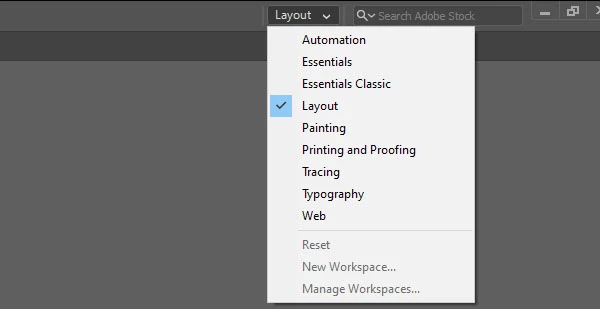
Any help would be much appreciated. 

Correct answer jane-e

Hi

Try resetting the Preferences. Details here:

https://helpx.adobe.com/illustrator/using/setting-preferences.html

~ Jane

2 replies

Participant
October 29, 2020

I did this and that got my panels/toolbars to show up again. However, when I try to change my workspace from essentials classic it won't change to anything else. Additionally, I am on essentials classic and it doesn't have all of the windows that essentials classic usually has...

Participant
October 29, 2020

Well, I reset it again and it's working now. I also reset the warning dialogs in the general preferences menu this time.

jane-e
Community Expert
Community Expert
October 29, 2020

I'm glad resetting preferences helped.


In your first post, Reset [current workspace] was grayed out. Try Resetting the workspace now. If you need other panels, you can find them in the Window menu

~ Jane

jane-e
Community Expert
jane-eCommunity ExpertCorrect answer
Community Expert
July 8, 2020

Hi

Try resetting the Preferences. Details here:

https://helpx.adobe.com/illustrator/using/setting-preferences.html

~ Jane