
JPHiggs
Known Participant
December 23, 2022
Answered

Can't create Minus Front keyboard shortcut

  • December 23, 2022
  • 5 replies
  • 2322 views

I need to use the Minus Front function a lot and need to set this to a keybaord shortcut in order to expedite my workflow and, for some reason, Minus Back is an option to set a shortcut, but not Minus Front. Is there something I'm missing or did they make yet another mistake and omit it as an option?
 

Correct answer pixxxelschubser

@Monika Gause  has already posted the solution. Create an action with the desired function from the Pathfinder Panel and give the action a shortcut. This way should normally work.

5 replies

pixxxelschubser
Community Expert
December 28, 2022

@JPHiggs 

Hi, you are right.

It's good that after re-reading the answers you have at least found a way (action + shortcut).


You might think it's a bad design - but it's not.


About shortcuts are responsive:

  • Menu commands and tools
    (Panels are generally not accessible unless the same command is also available elsewhere, e.g. in the menu).


There are two ways for the Pathfinder:

  1. once via the Pathfinder Panel (not directly accessible with a shortcut, but with action + shortcut)
  2. once via the menu command: Effect -> Pathfinder (shortcut possible, because menu command).


In my screenshot you can see both menu Pathfinder effects (from my German UI in older Illustrator 24.3):

  • "Subtrahieren" (means Minus Front)
  • "Hinteres Objekt abziehen" (means Minus Back)


Conclusion:

As I said before - menu commands are accessible, but panels are only accessible in a roundabout way.


Additional information:
I also marked @Monika Gause's post as the correct answer. You probably didn't know that you can mark more than one answer as correct.

JPHiggs
JPHiggsAuthor
Known Participant
December 29, 2022

Thank you @pixxxelschubser for the replies and the help! I've been frustrated because 99% of the people "helping" don't bother to read the problem or actually describe the solution, they just want to rack up the number of comments they have instead.


That being said, your assistance has been the only useful thing I've gotten across a few message boards. Again ,thank you. 

Additionally, the English version does not have "Minus Front" on it

It does have "Subract", but as I had told @CarlosCanto , it is NOT the same thing. He didn't bother to read that I'm looking for shortcuts to make actions quicker... not spend more time grouping items together before I can perform an action.

CarlosCanto
Community Expert
December 30, 2022

I did read your comments and everybody else's as well. You wanted to add a shortcut key to "Minus Front" effect but couldn't find it, we all told you to use "Subtract" instead (bad design or not).


Then you insisted in finding "Minus Front" effect but tried "Subtract" anyway but didn't work. I just pointed out the requirements to make it work. If grouping defeats the purpose of trying to make your process more efficient that's another story. 

pixxxelschubser
pixxxelschubserCorrect answer
Community Expert
December 23, 2022

@Monika Gause  has already posted the solution. Create an action with the desired function from the Pathfinder Panel and give the action a shortcut. This way should normally work.

JPHiggs
JPHiggsAuthor
Known Participant
December 28, 2022

Not until reading this comment did I know to "create an action" then make a shortcut to that.

Clarification on @Monika Gause 's part would have earned the correct answer. 

-Also- poor design on Adobe's part to omit a working link to that action in the keyboard shortcuts menu

pixxxelschubser
Community Expert
December 23, 2022

Again: Your screenshot only shows the menu command from the effect menu - and not the function from the Pathfinder Panel. That is the reason why it does not work for you.


Do you know the difference between the Pathfinder menu commands and the functions from the Pathfinder panel?

JPHiggs
JPHiggsAuthor
Known Participant
December 28, 2022

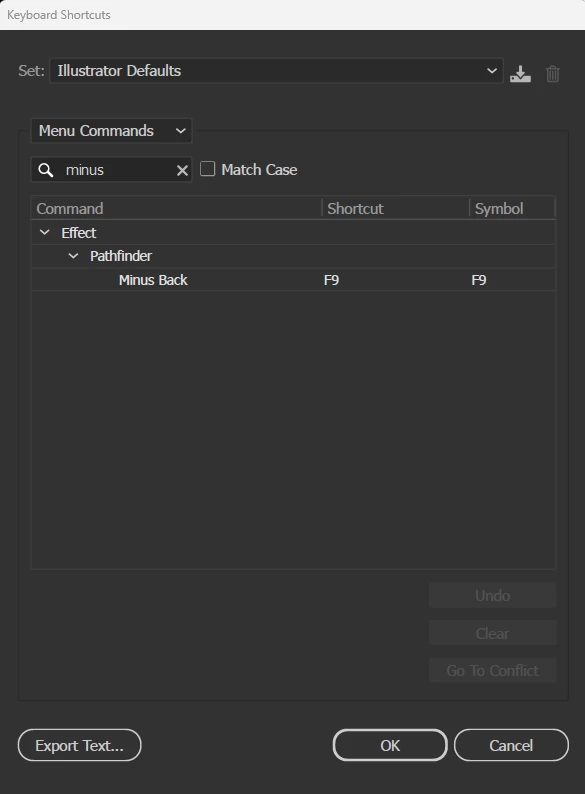
In the "Keyboard Shortcuts" options menu, I can search for "minus" which shows no results under "Tools" and "Menu Commands" only shows "Minus Back" (as shown in the above picture).

"Again:"

How do I set a keyboard shortcut to "Minus Front"?

I'm assuming you're asking about this panel.... I still can't create a keyboard shortcut to it.


pixxxelschubser
Community Expert
December 23, 2022

@JPHiggs 

This only applies to the Pathfinder effect in the Effect menu. But not for the Pathfinder Panel modes.
Sorry.

Monika Gause
Community Expert
December 23, 2022

You mean subtract from the Pathfinder panel? I have no issues using that in an action. Do you have objects selected when you try?

JPHiggs
JPHiggsAuthor
Known Participant
December 23, 2022

I can use it from the panel just fine, I'm referring to adding a keyboard shortcut to expedite workflow. I've spent about 45 minutes so far "back-and-forth"ing my mouse from the layers I need to removing the front from, over to the Minus Front button.... a single key press would be a huge time saver, and that is the reason we can create our own shortcut keys -BUT- the Adobe team has failed to enable that function and for some reason HAS allowed the Minus Back (which does not work in my case). It's just another failure on Adobe's part as usual and I was hoping someone had a workaround or knew something I didn't.

CarlosCanto
Community Expert
December 23, 2022

as Monica mentioned, use the "Subtract" Effect if you want to "punch" the front most image (same as Minus Front in the Pathfinder Panel)