
Known Participant
May 31, 2017
Answered

Can't disable snap to point

  • May 31, 2017
  • 4 replies
  • 15945 views

Hello,

I have disabled snap to point under View and also the Smart guides are off, however it still snaps to points

Can't find how to turn this off for days.

BTW align to pixel grid is also off!

Thanks in advance!
This topic has been closed for replies.
Correct answer Om Nath Jha

Hi AgrisCaurs,

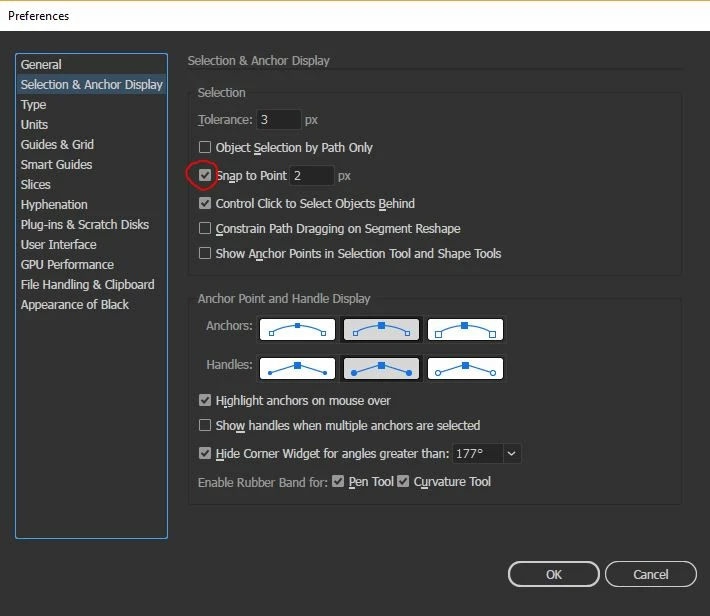
Here's a screenshot for Monika's suggestion. Do share if that resolve your issue.

Regards,

Om

4 replies

Inspiring
December 6, 2022

On Illustrator 25.4.7, there is also this setting. It seems you can have all snapping settings off, but if you don't disable this one seting, your pen still snaps on vectors.

Participant
November 20, 2018

In the new version for CC 2018, this section in the preferences tabs no longer exists and I still can't remove the snapping problem even though I have removed the snapping from View> Grids and Guides and unticked Snap to Guides! If anyone has a solution for this please let me know.

Thanks

jsndmpsy
Participant
October 20, 2021

In the Creative Cloud you have to go to Preferences > Tools and disable Snap Vector Tools and Transforms to Pixel Grid.


Monika Gause
Community Expert
Community Expert
October 20, 2021

Are you sure that your post is about Illustrator?

Om Nath Jha
Om Nath JhaCorrect answer
Legend
May 31, 2017

Hi AgrisCaurs,

Here's a screenshot for Monika's suggestion. Do share if that resolve your issue.

Regards,

Om

Inspiring
November 14, 2017

I had the same problem and the 'Answer' did not help.

...What did help was disabling "Highlight anchors on mouse over" in the same Preferences section.

Participant
December 7, 2018

Unchecking that box had no effect for me either and I feel like it absolutely should have. Not to mention the other couple places where you can turn snap to points off. The snapping was driving me crazy. "...What did help was disabling "Highlight anchors on mouse over" in the same Preferences section."  Thanks a bunch

Monika Gause
Community Expert
Community Expert
May 31, 2017

Which version, which system?

What exactly is happening?

Known Participant
May 31, 2017

Illustrator CC2017 (2017.0.2)

When using pen tool and creating new points the cursor snaps to points of other shapes although "Snap to point" under view is disabled and Smart Guides are off.

If necessary I can do a screencapture to show it.

Thankyou

Monika Gause
Community Expert
Community Expert
May 31, 2017

In that case open Preferences > Pen tool and anchor point display and turn off snapping there.