
Nashicle
Participant
December 6, 2018
Answered

Can't match CMYK with Pantone colour

  • December 6, 2018
  • 1 reply
  • 1773 views

Hiya,

We're rolling out a new brand and as a part of setting out the brand palette we've used specific Pantone shades to make life easier for everyone.

However, when I try to input the CMYK equivalent of the Pantone shade(PANTONE 2767 C - Find a Pantone Color | Quick Online Color Tool), the colour looks very different.

I've checked that my Document Color Mode> CMYK color and my current Assign Profile is Working CMYK: US Web Coated(SWOP) v2

As of now, the only way I can get my colors to look like the Pantone colours is to use the hexadecimal equivalent found on the Pantone site.
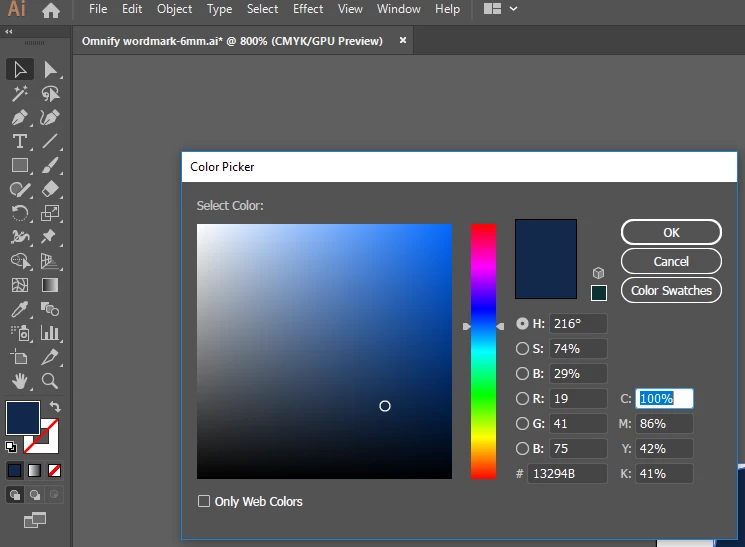
Ideally, this should result in the corresponding CMYK but it doesn't.

What am I doing wrong here?

This topic has been closed for replies.
Correct answer Monika Gause

Part of the reason why you use Pantone colors at all is that a lot of colors cannot be reproduces using CMYK. What the Pantone website shows you is the closest possible match. Sometimes it really is a close match, sometimes not so much.

Don't rely on online tools. Get printed samples. There's a reason for printed Pantone swatches books.

1 reply

Monika Gause
Community Expert
Monika GauseCommunity ExpertCorrect answer
Community Expert
December 6, 2018

Part of the reason why you use Pantone colors at all is that a lot of colors cannot be reproduces using CMYK. What the Pantone website shows you is the closest possible match. Sometimes it really is a close match, sometimes not so much.

Don't rely on online tools. Get printed samples. There's a reason for printed Pantone swatches books.