itss24371599
Participating Frequently
July 17, 2025
Answered

Can't Resize Artboard Freely in Illustrator 2025

  • July 17, 2025
  • 3 replies
  • 988 views

in Illustrator 2024 I could create any size artboard I wanted. Where has that function gone in 2025?


<Title renamed by MOD>

 

Correct answer Doug A Roberts

Sorry, and thank you, but none of this addresses my question. I'm not trying to create a huge drawing, I'm trying to control the artboard size myself.  Thanks.


This is the artboard tool in the default 'Advanced' toolbar:
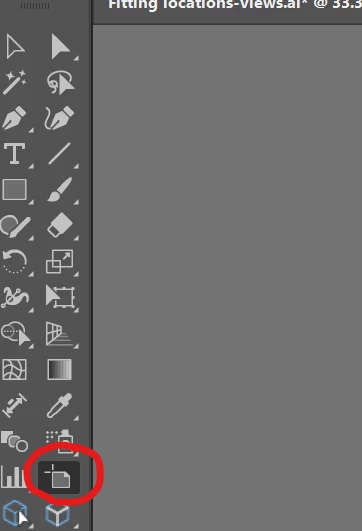
 

3 replies

Ton Frederiks
Community Expert
Community Expert
July 17, 2025

The Large Canvas option that Bobby mentioned is only available when you create a new document.

You cannot create artboards larger than 227 inches in a regular canvas document and you cannot convert a regular to a large canvas document.

Community Expert
July 17, 2025

That's right. Another serious work flow issue: few if any applications outside Illustrator will import AI or PDF files with large canvas sizes preserved. The artwork will often be reduced to 10% of its original size.

Doug A Roberts
Community Expert
Doug A RobertsCommunity ExpertCorrect answer
Community Expert
July 17, 2025

Sorry, and thank you, but none of this addresses my question. I'm not trying to create a huge drawing, I'm trying to control the artboard size myself.  Thanks.


This is the artboard tool in the default 'Advanced' toolbar:


Community Expert
July 17, 2025

Adobe Illustrator has always had upper limits for canvas sizes. By the way, all vector graphics applications have canvas size limits; none offer unlimited canvas sizes. When Illustrator was based on Postscript the size limit was around 120" X 120". The change from Postscript to PDF with Illustrator 9 bumped the canvas size limit up to 227" X 227". That was 25 years ago. It has already been 5 years since Illustrator's large canvas mode was introduced with version 24.2. That mode merely does some internal trickery to make artboards up to 2275" X 2275" possible.

Doug A Roberts
Community Expert
Community Expert
July 17, 2025

What is preventing you? What difference between versions are you experiencing?

itss24371599
Participating Frequently
July 17, 2025

As I said, in Ilustrator 2024 (Mac) i would tick the "artboard" icon and could drag the boundaries to any size.  In 2025, there is no such icon..