


imago stuhr
Participating Frequently
March 18, 2022
해결됨

Can't save any document in Illustrator on Mac M1 Monterey 12.3

  • March 18, 2022
  • 7 답변들
  • 3078 조회

I'm using Illustrator 26.1 on a MacBook Air M1 with OSX Monterey 12.3.


It's not possible to save any file. If I click on file > save (save as) the upcoming save-window has a disabled "save" (sichern) Button. It's also not possible to change the folder or click on anything else. It's all deactivated. I can only change the filename, but that has no other effect.


It's only possible to save files as cloud document, which I don't want to do, because the files are needed to be stored on our NAS


On Monterey 12.2.x everything worked fine. And Illustrator is the only application which has trouble with this update. Photoshop works as expected.
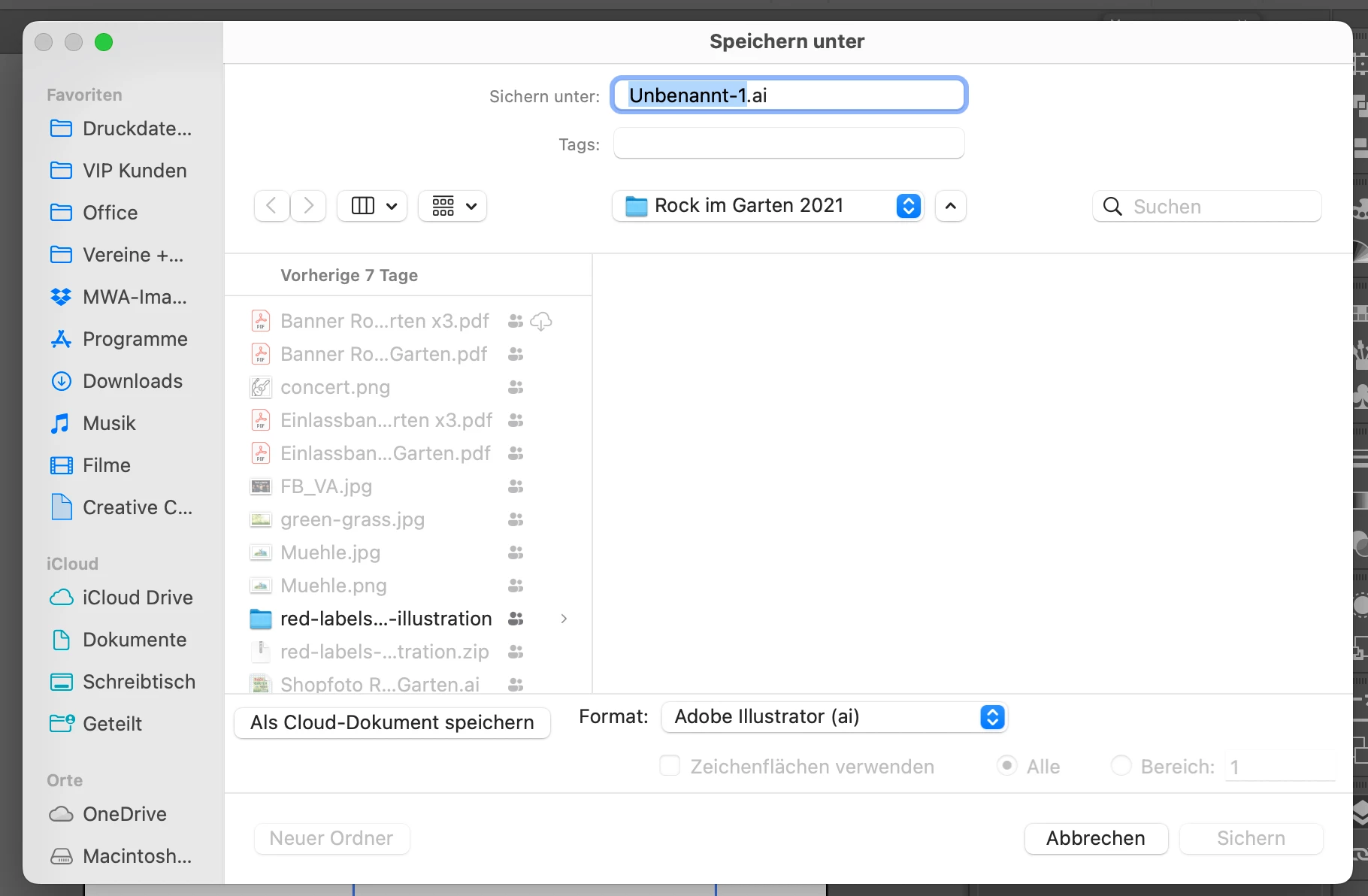


Does anyone have the same issue?


best regards

Benehem

이 주제는 답변이 닫혔습니다.
최고의 답변: Anshul_Saini

Hi @imago stuhr @Avinash Jai Singh @Yashlen237798756qrf @markpaulmac,


We are glad to inform you that the save button greyed out/ unclickable issue has been addressed. We worked with Apple and addressed this issue with the latest macOS update, v12.3.1, released last week. I would request you to update and let us know if the issue still persists.


Regards,

Anshul Saini

7 답변

Participant
April 22, 2022

I've been having a similar issue on 12.3.1 where Illustrator (26.2.1) hangs whilst trying to use the save as dialogue or using save from the 'Save for Web' (legacy) function. I discovered that clicking on the finder icon in the dock and then clicking back to Illustrator enables me to carry on with the save...

Anshul_Saini
Community Manager
Community Manager
April 5, 2022

Hi @imago stuhr @Avinash Jai Singh @Yashlen237798756qrf @markpaulmac,


We are glad to inform you that the save button greyed out/ unclickable issue has been addressed. We worked with Apple and addressed this issue with the latest macOS update, v12.3.1, released last week. I would request you to update and let us know if the issue still persists.


Regards,

Anshul Saini

Anshul_Saini
Community Manager
Community Manager
March 23, 2022

Thanks for sharing the details, @imago stuhr. We are working with Apple to resolve the issue.
(https://helpx.adobe.com/illustrator/kb/unable-to-save-files-macOS.html)


In the meantime, I would request you & @markpaulmac to try the following workarounds:

  • Resize the Save As dialog and check.
  • If that doesn't help, then pan around with the dialog and check if the Save button appears.


I hope it helps!


Thanks & Regards,

Anshul Saini

imago stuhr
imago stuhr작성자
Participating Frequently
March 24, 2022

Yes, resizing the dialog solves the problem.

Thank you Anshul !

Participant
March 19, 2022

I am having the same issue on my M1 MacBook Air.  Deleated Illustrator and reinstalled with the problem still remaining.  The issue is not happening on my M1 Pro MAX MacBook Pro.  Both machines are running macOS 12.3 Monterey. So very odd.  My workaround for my M1 MacBook Air was to istall the current Illutrator Beta.  The Beta allows me to save.


Anshul_Saini
Community Manager
Community Manager
March 18, 2022

Hi @imago stuhr,

We are sorry for the trouble. We have logged a bug with the Product team, and they have started investigating the issue.

It seems the issue started right after the release of the macOS Monterey v12.3, as it is happening with the new & older version of Illustrator.


I would request you to please upvote this UserVoice (https://illustrator.uservoice.com/forums/601447-illustrator-desktop-bugs/suggestions/44917468-can-t-... if not done already. By doing this, you will keep getting updates on the issue.

Also, we checked on multiple Mac machines running macOS Monterey v12.3 and were unable to replicate the issue.

We checked with multiple users on a remote session, and installing an older version also didn't help.

One user reached out to us, and uninstalling the whole creative cloud resolved the issue for him. However, it is not an ideal or recommended resolution.

I would request you to please share a few details it would really help us investigate the issue:

  • Please confirm you are running macOS Monterey v12.3
  • Please confirm the exact Illustrator version you are using
  • Please confirm that the save option is greyed out and is unclickable (Share a screenshot if possible)
  • Where are you trying to save the files? (Please mention the location or destination folder name)
  • Share the SPX file from MAC (Most Important):
    Click on Apple Icon > About this Mac > System Report
    This will launch the System Profiler
    Then Click File > Save > Save in Creative Cloud Files or anywhere you like.
    Then open https://assets.adobe.com/files if saved on the Creative Cloud folder.
    Click on three dots next to spx file > Share > Copy Link and paste the download/ copy link here.


We will be looking forward to your response.


Regards,

Anshul Saini

imago stuhr
imago stuhr작성자
Participating Frequently
March 19, 2022
  • I'm running Monterey 12.3 on a MacBook Air M1
  • Illustrator 26.1
  • The save button is greyed out and not clickable. Also it's not possible to change the folder, because the folder list is also not clickable
  • Open an existing file an save it via cmd + s is possible.
  • Share the SPX file from MAC (Most Important):
    https://shared-assets.adobe.com/link/7f10e4f0-562a-4b8e-785a-51b375c2a86c 
Monika Gause
Community Expert
Community Expert
March 18, 2022
sishamIAGD
Community Expert
Community Expert
March 18, 2022
imago stuhr
imago stuhr작성자
Participating Frequently
March 18, 2022

Yes I've been through this list.

It's not just one file that I can't save. I can't save any file. Even if I do a new file from scratch with only a ractangle in it, I can't save it.