This topic has been closed for replies.

2 replies

kphotopage
Legend
April 3, 2024

Mark, as always there are many ways of doing things.

I’m working with Live Type, Text on a path.


I’m not quite sure of your end goal.

Getting started. Concentric circles. The outside measures 32mm

Live Paint. Fills and Strokes.

Expand Live Paint. Unite same colors for Tabs.

The center stroke is for Text on Path.


Round the corners on your Tabs

Text on Path. Be sure to Type>Type on Path Options, Align to Center.


K

Community Expert
April 3, 2024

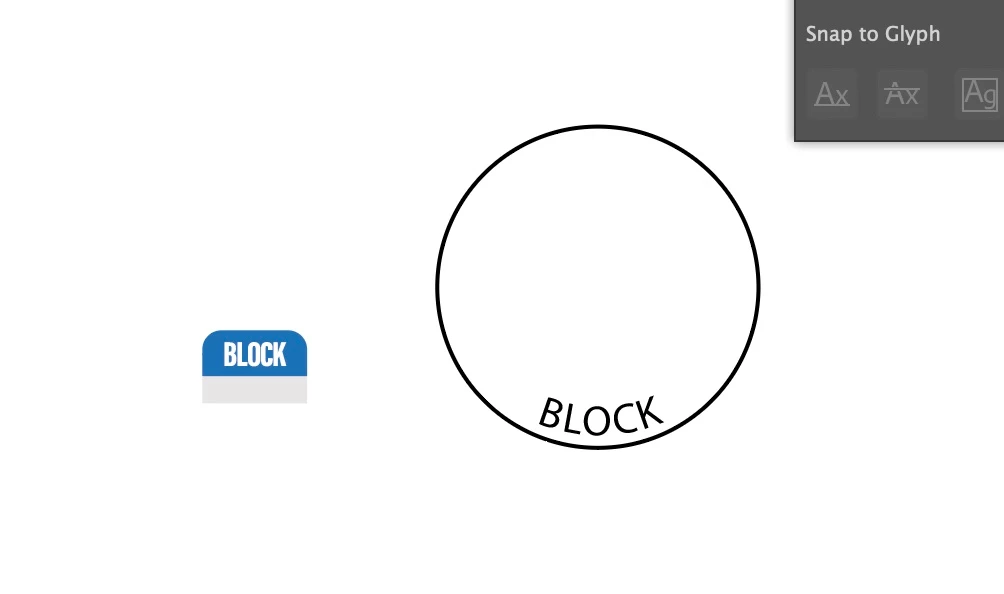
I believe what the original poster wanted was a way to make type warp along the curve. Illustrator's stock Text on Path effect merely rotates letters. That approach works okay with letters that are small in proportion to the curve. Bigger letters tend to look wacky and jumbled. Problems vary depending on the typeface used.

Astute Graphics' Reform Text plugin is the only solution I know of that will partially warp text to a curve and still leave the text in a live state. The art brush approach I've described previously is "destructive" since it requires converting the live text to outlines before turning it into a brush.

Known Participant
April 3, 2024

Yes this is the issue. I need to the tab form and curve as I type. So I can create many tabs with different words.

Monika Gause
Community Expert
Community Expert
March 12, 2024

How do you want this to look?

Is it absolutely necessary to make it with effets?

Or would an art brush work as well?

Known Participant
March 12, 2024

These are 'tabs' that will be printed - the 'Block' tab is how they will look - they will be applied (stuck onto) to a circular base, hence the need for the shape of them to wrap round a circle.