
Participant
October 15, 2020
Answered

Can't select or move anything on illustrator

  • October 15, 2020
  • 2 replies
  • 613 views

I downloaded an AI file from a website, when i opened it i can't move or select anything on the boards. I can't select any tools as well. The only thing that appear is a mini pen/pencil with a anti/no sign. I tried to unlock the layers but the options in the object are all in grey colour and can't be selected. 
This topic has been closed for replies.
Correct answer Bill Silbert

Could you post a screenshot showing your layers panel? Is the problem only happening with the one file?

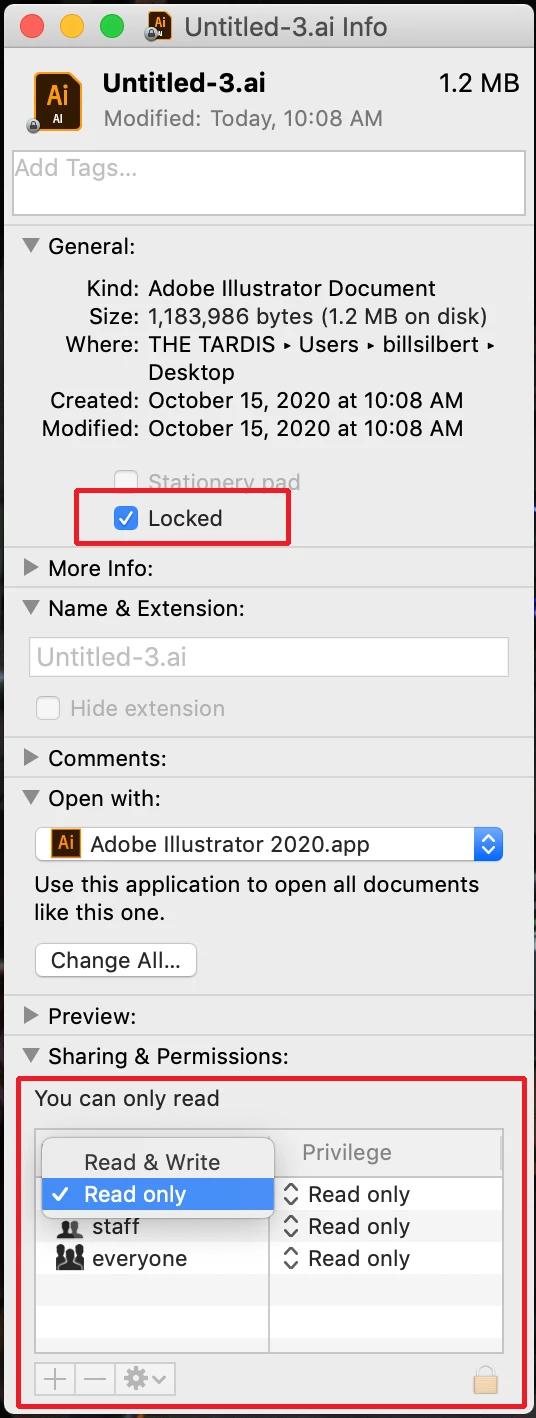
If it is just the one file and you are on a Mac (I'm not sure how to do this on a PC) click on the file on the desktop and use the keyboard command Command-i to get the info dialog for the file. Check in there to make sure that you have read and write privledges for the file and that the file is not locked.

2 replies

Bill Silbert
Community Expert
Bill SilbertCommunity ExpertCorrect answer
Community Expert
October 15, 2020

Could you post a screenshot showing your layers panel? Is the problem only happening with the one file?

If it is just the one file and you are on a Mac (I'm not sure how to do this on a PC) click on the file on the desktop and use the keyboard command Command-i to get the info dialog for the file. Check in there to make sure that you have read and write privledges for the file and that the file is not locked.

Ashutosh_Mishra
Inspiring
October 15, 2020

Hi there,


Sorry to hear about this. Would you mind sharing version of the OS & Illustrator? Does it happen with this specific file only?

Would you mind sharing the link to this file?

This will help us understand the concern and assist you accordingly. Looking forward to your response.


Regards,

Ashutosh