Michael Domino
Inspiring
March 26, 2019
Answered

Can this be done in Illustrator?

  • March 26, 2019
  • 3 replies
  • 1035 views

Hi - I would like to make this kind og dot-effect (Screen) directly in Illustrator if it is possible?

For the moment, I drag the design into Photoshop and run the "Pixelate -> Colour Halftone" effect on a selected part of the B&W version of the design.

This is then returned to Illustrator as a bitmap so that I can assign spot colours to it...

The downside to this is that it is complicated as long as you are in the process of designing, resizing etc...

I can run the same effect in Illustraor, but only on B&W artwork.

Does anybody know a way to do this?

Thank you for your time.

++Michael

    This topic has been closed for replies.
    Correct answer Ton Frederiks

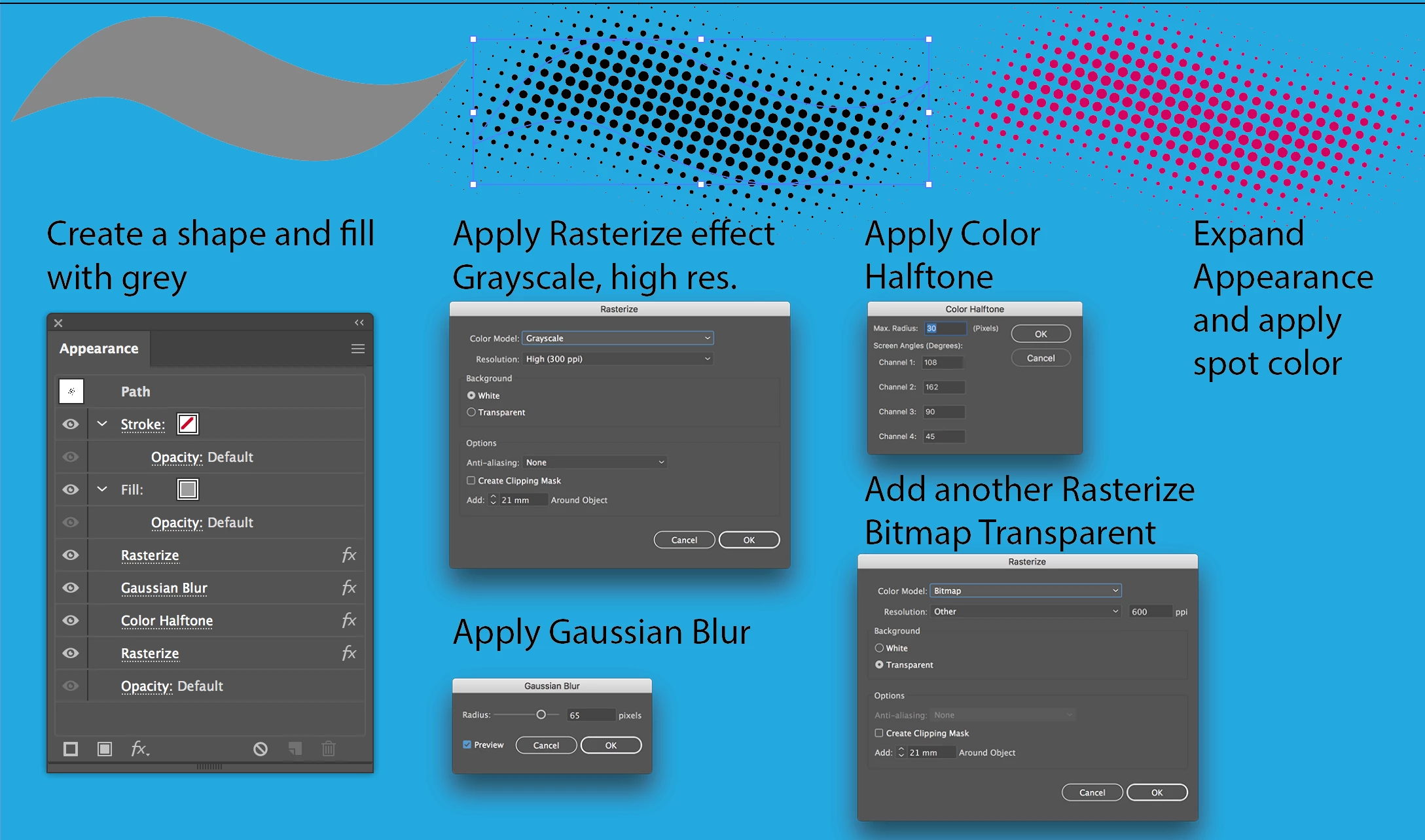
    You can do this in Illustrator, without going to Photoshop.

    I would make a Graphic Style of the following effects an expand the Appearance when finished (or expand a copy so you can change your mind).

    3 replies

    Ton Frederiks
    Community Expert
    Ton FrederiksCommunity ExpertCorrect answer
    Community Expert
    March 26, 2019

    You can do this in Illustrator, without going to Photoshop.

    I would make a Graphic Style of the following effects an expand the Appearance when finished (or expand a copy so you can change your mind).

    Michael Domino
    Inspiring
    March 26, 2019

    Wow - this is brilliant -Thank you very much! It works wonderfully :·)

    ++michael

    Ton Frederiks
    Community Expert
    Community Expert
    March 27, 2019

    Good to hear that helped!

    rcraighead
    Legend
    March 26, 2019

    Here's a "poor artist" approach:

    1. Create blend between two or more lines
    2. Save as Static Symbol (for safe keeping)
    3. Drag blended line into Brush Panel and make "Art Brush"
    4. Assign Color Halftone effect to lines stroke
    5. Save as "Graphic Style"
    6. Use name graphic style on pencil or brush strokes on "Opacity Mask" layer of colored rectangle.

    Dropbox - ScreenLine.ai

    Michael Domino
    Inspiring
    March 26, 2019

    Thanks! Very useful as well!

    ++michael

    Monika Gause
    Community Expert
    Community Expert
    March 26, 2019

    You can do a lenghty process of back and forth ,autotracing and the like.

    Another possiblity would be to use the plugin Phantasm.