
mickenzieb1515765
Participant
August 28, 2020
Answered

Can you Add more quick select colors?

  • August 28, 2020
  • 3 replies
  • 400 views

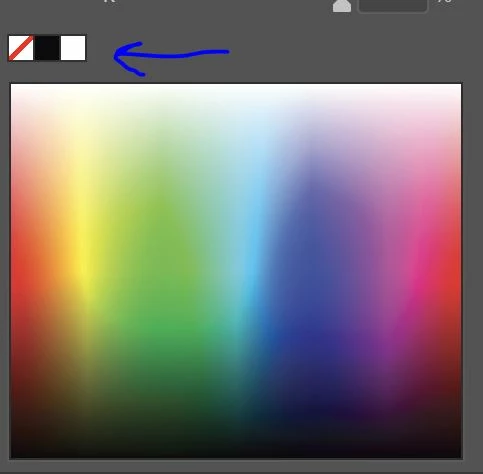
You know if you have your color wheel up in illistrator, above the main color wheel is your default "transparent, black and white" I work with a laser cutter and often use red to indicate scoring vs cutting. It would be really handy to just click a red square like I do the black, white and transperent.
This topic has been closed for replies.
Correct answer Ashutosh_Mishra

Hi there,


Thanks for providing your feedback. I'll pass this on to product team. You may also share this feature request on Adobe Illustrator UserVoice. This forum is monitored by product team and they might look into it for future releases.

Hope it helps.


Regards,

Ashutosh

3 replies

Ton Frederiks
Community Expert
Community Expert
August 28, 2020

What's wrong with clicking a swatch, like Monika suggested?

Monika Gause
Community Expert
Community Expert
August 28, 2020

Swatches don't work for this?

mickenzieb1515765
Participant
August 28, 2020

no, that was my first guess and try but wouldnt let me add or have the option to "add to a menu" , drag and drop, nothing.

Monika Gause
Community Expert
Community Expert
August 28, 2020

"Add to a menu"

Please tell us how you want this to work and where you want to select.

Ashutosh_Mishra
Ashutosh_MishraCorrect answer
Inspiring
August 28, 2020

Hi there,


Thanks for providing your feedback. I'll pass this on to product team. You may also share this feature request on Adobe Illustrator UserVoice. This forum is monitored by product team and they might look into it for future releases.

Hope it helps.


Regards,

Ashutosh