
Glenn WHO
Participant
October 9, 2023
Answered

Cannot apply a gradient to a set of objects

  • October 9, 2023
  • 2 replies
  • 411 views

I'm trying to apply a gradient accross a group of simple circular objects, but it is not working.

I have tried creating a compound path of the objects but it is not applying the colour accross all the circles.

This topic has been closed for replies.
Correct answer Ares Hovhannesyan

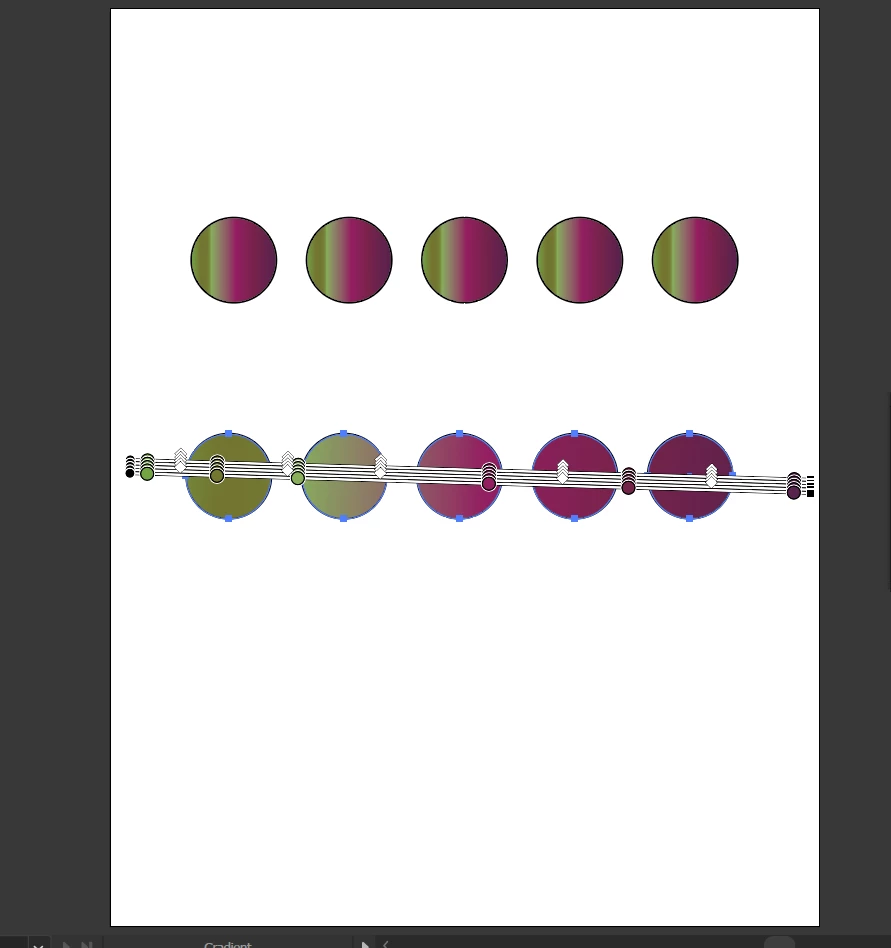
Do I understand right, that you want to spread gradient through many objects? Like this

 If yes , just select all circle and draw gradient widget from left to right.
 

2 replies

Ares Hovhannesyan
Community Expert
Ares HovhannesyanCommunity ExpertCorrect answer
Community Expert
June 11, 2024

Do I understand right, that you want to spread gradient through many objects? Like this

 If yes , just select all circle and draw gradient widget from left to right.


Doug A Roberts
Community Expert
Community Expert
October 9, 2023

Freeform gradients don't work properly on compound paths composed of discrete objects. You could use the circle paths as a mask for a gradient object as a workaround.

Participant
June 11, 2024

Absolutely. Creating a compound path from two nested circles with the same mesh gradient may "eat up" the resulting gradient (it is listed in Appearance, but is not dispayed in a resulting path)! Thank you so much for your comment. And what a shame for Adobe not fixing this bug by mid-24th!