maggiev90207070
Participant
September 18, 2018
Answered

Cannot create clipping mask?

  • September 18, 2018
  • 6 replies
  • 21296 views

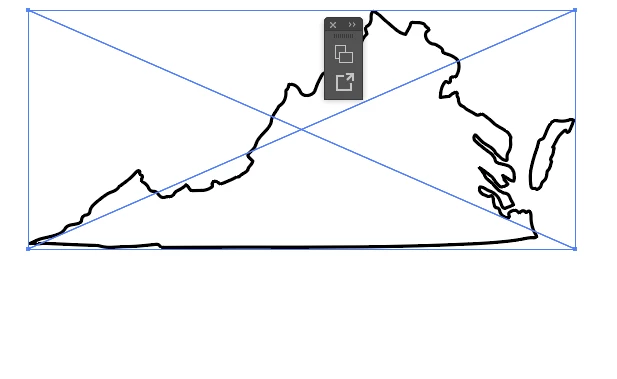
I'm trying to create a simple (or so I thought) clipping mask of this image- so that the state is filled in by the pattern. But for some reason I keep getting the notification that it cannot be created. I'm not sure if it's a problem with the Virginia outline? Or what....help?

This topic has been closed for replies.
Correct answer Monika Gause

Oh, I deleted the Blacksburg for the time being while I was trying to fix the issue...maybe it is an image..? I don't really know- my friend traced it on her computer manually I think. Not really sure the details. Is there a way to make it a path?

here's what it looks like on it's own..


It's an image.

Or maybe a linked PDF.

You could autotrace it. You would then need to do some post-processing to the result and then you can use it as a clippping mask

6 replies

Inspiring
September 19, 2018

Your clipping mask object needs to be a single filled object to work properly.  If you have a stroke but no fill, or if you have little sections of path, but not one full object, it won't work. 

maggiev90207070
Participant
September 19, 2018

jane-e
Community Expert
Community Expert
September 19, 2018

Maggie, I don’t see Blacksburg in your layers panel. Where did that go?

Fun fact: both my kids went to school in Blacksburg.

It’s called Artwork 1. Is it an image or a path?

maggiev90207070
Participant
September 19, 2018

Oh, I deleted the Blacksburg for the time being while I was trying to fix the issue...maybe it is an image..? I don't really know- my friend traced it on her computer manually I think. Not really sure the details. Is there a way to make it a path?

here's what it looks like on it's own..

maggiev90207070
Participant
September 19, 2018

Thanks to everyone who has jumped in to help! Update: it's no longer saying "cannot create clipping mask", but now when I create it, nothing visibly happens...at all. It looks the same. The whole state is one object, including the little eastern shore. Any ideas as to what's going on? I've never had such a hard time doing such a simple thing in Illustrator!

*At this point I'm convinced there's something wrong with the state outline, because I've tried this with multiple backgrounds with no luck. Either nothing seems to happen, or the pattern in the back just goes away altogether.

Monika Gause
Community Expert
Community Expert
September 19, 2018

Please show us what is inside the layers panel.

We can't tell without that.

jane-e
Community Expert
Community Expert
September 18, 2018

You might need to make a compound path of the Eastern Shore and the rest of the Commonwealth first to make one object. Then make sure that object is at the top of everything else.

Select all of it and try again. Let us know if it works!

Go Hokies!

Andrei Koziakov
Inspiring
September 18, 2018

Hi

Be sure that object is prepared for using as a clipping mask:
— it should be located above all the objects
— it should be a separate path, but not a part of the group or etc...
— in your case I see little island on the right side, so the main path and island must be converted to one compound path (Cmd+8)

Also there is one simple way, which allows to prepare any path to be used as a mask:

1. Select path using Group Selection Tool (Direct Selection with holding Alt or Opt key). Just click with this tool on any anchor point or segment of outer path. In your case also select the island, holding Shift.

2. Cut it Cmd+C

3. Use Paste in front command (Cmd+F) and be sure that pasted paths located above all the objects
4. Create one compound path from main path and island (Cmd+8)
5. Select all this objects and create mask Cmd+7

I hope it will be useful

Participant
June 22, 2022

this does not seem to work for illustrator for ipad.  the "make clipping mask" option is greyed out even though i've met all the requirements for the object to be an eligible clipping mask.

Doug A Roberts
Community Expert
Community Expert
June 22, 2022

This thread is only relevant to the desktop version. The iPad app diverges greatly in its feature set.

Monika Gause
Community Expert
Community Expert
September 18, 2018

WHat exactly is the message?

You have to make sure that the outline is a path. One path. The disconnected part needs to be joined with the bigger one as a compound path.