


Participant
October 7, 2014
Answered

Cannot find Image Trace options

  • October 7, 2014
  • 2 replies
  • 26028 views

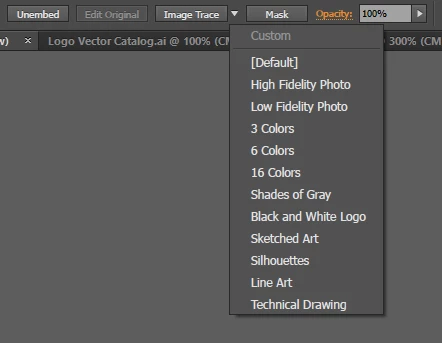
When I do an image trace in Illustrator CC 2014, I have a number of preset options I can use.  There used to be a dialog that I could access to customize trace settings, but I can't find that any more.  Has Adobe "improved" Illustrator by removing this option?  Or is it hidden somewhere?

See attached image for reference.
This topic has been closed for replies.
Correct answer AshutoshChaturvedi

skippe wrote:

There used to be a dialog that I could access to customize trace settings, but I can't find that any more. 

Image trace is a panel. Go to Windows>Image Trace.

Are you migrating from some older illustrator version to CC ?

2 replies

mostafak64222657
Participant
March 25, 2017

you can customize trace settings from this Window

rcraighead
Legend
May 25, 2017

Can I run a custom Image Trace Preset from an Action? I think the answer it "NO", but can't believe Adobe would not support this.

AshutoshChaturvedi
Community Manager
AshutoshChaturvediCommunity ManagerCorrect answer
Community Manager
October 7, 2014

skippe wrote:

There used to be a dialog that I could access to customize trace settings, but I can't find that any more. 

Image trace is a panel. Go to Windows>Image Trace.

Are you migrating from some older illustrator version to CC ?

skippeAuthor
Participant
October 7, 2014

I've been using CC for a while, but I don't do a lot of image tracing.  It used to be called Live Trace, and it had a separate dialog for options.  Looks like the Image Trace panel has what I need.