


Cannot save

Copiar vínculo al Portapapeles
Copiado
Hi,
I cannot save my file. I have to change always the name of my file. The error code is:
"Adobe illustrator the file may be read-only, or another user may have it open. Please save the document with a different name or in a different folder."
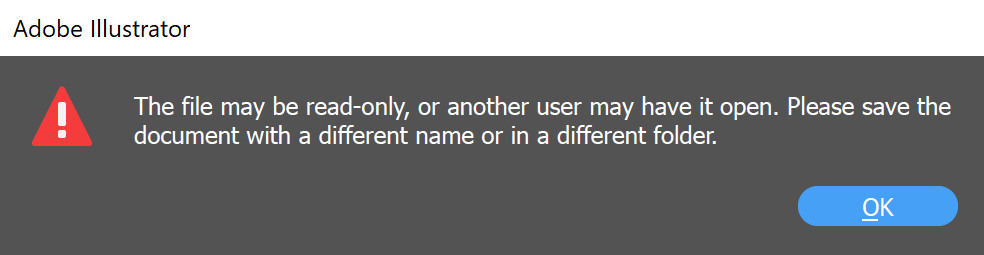
I know that the file is not read-only or it is not open by another user or software. I had to save it with 10 different names for each editing.
How can I solve this problem?
Thank you



Examinar y buscar tutoriales y artículos relacionados
 8
réplicas
8
8
réplicas
8



Copiar vínculo al Portapapeles
Copiado
Is this your own computer or is it managed by someone else (like a work or school computer)? Are you saving your files locally to the computer itself, or to a server of some kind?
Copiar vínculo al Portapapeles
Copiado
Hi,
It is my own computer. I save it locally to the computer itself. Additionally, local place is my Google Drive.


Copiar vínculo al Portapapeles
Copiado
Are you saving to a synchronized or watched folder (Dropbox, Google ...)?
Copiar vínculo al Portapapeles
Copiado
Yes, it is Google Drive but Google Drive doesn't sync anything while I was saving my file.
Copiar vínculo al Portapapeles
Copiado
Copiar vínculo al Portapapeles
Copiado
Hi,
When I move it to my local drive (not Google Drive), there is no problem now.
But all my files are in my Google Drive. How can I fix this problem for my other files? I cannot move them to my local drive.
Thank you
Copiar vínculo al Portapapeles
Copiado
Illustrator has issues with saving to synchronized folders.
Are you using the latest version?
Copiar vínculo al Portapapeles
Copiado
Yes I am using the latest version


Encuentra más inspiración, eventos y recursos en la nueva comunidad de Adobe
Explorar ahora
 AdChoices